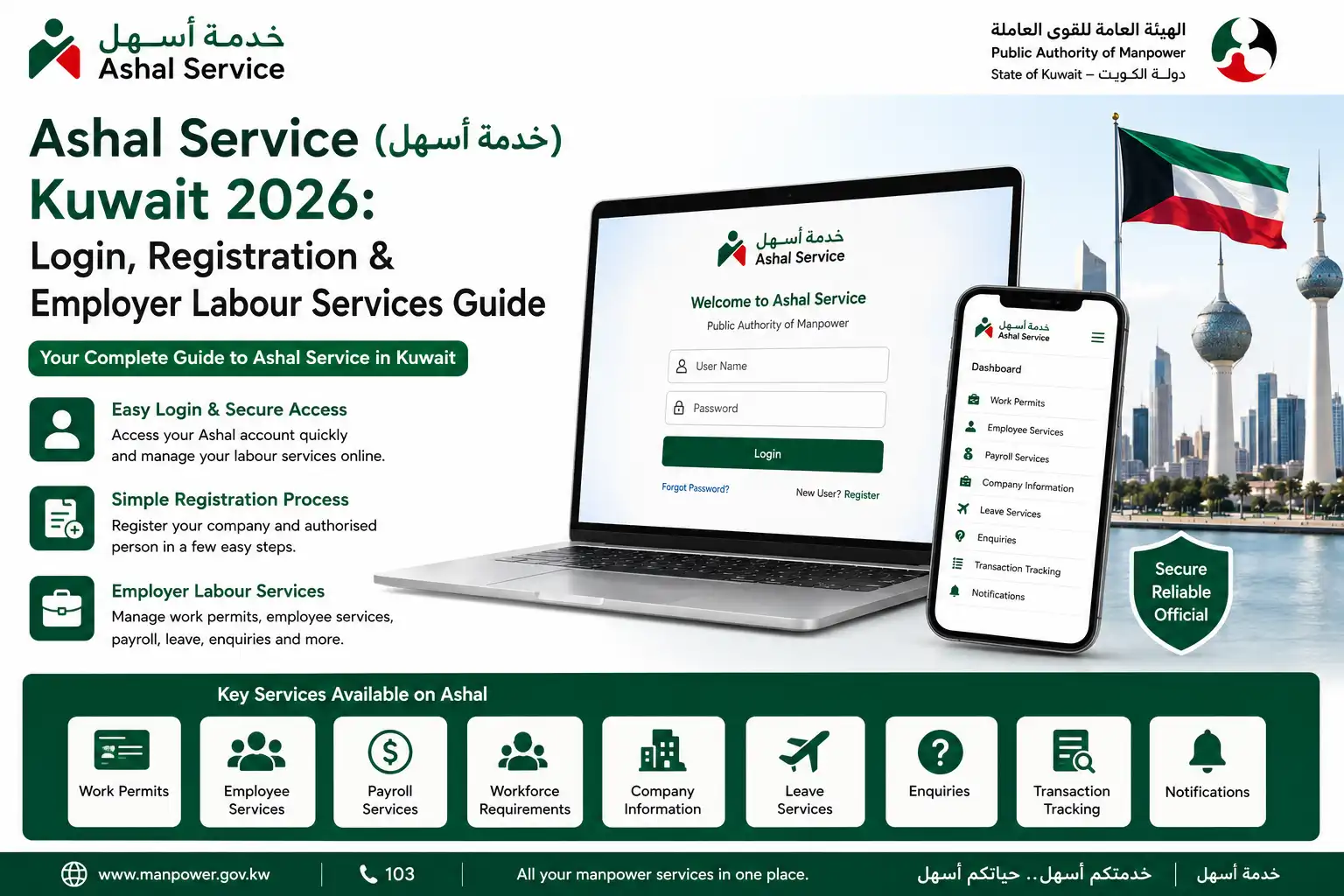

Ashal Service (خدمة أسهل) is Kuwait’s online labour-services platform provided by the Public Authority for Manpower (PAM) for employers and authorised company representatives, bringing various workforce-related transactions into one digital system, including work permits, employee and workforce records, payroll-file submissions, leave information, company-file management and transaction enquiries. For Kuwait employers, Ashal Service makes routine labour procedures more convenient by allowing many services to be handled and monitored online, while PAM also provides a dedicated support channel for users who need help with Ashal registration, login or other service-related issues.
What Is Ashal Service(خدمة أسهل) in Kuwait?
Ashal Service(خدمة أسهل) is an electronic platform provided by Kuwait’s Public Authority for Manpower (PAM) that enables employers to manage various manpower and labour-related procedures online. Instead of visiting a PAM office for every routine transaction, employers can use the platform to submit and manage eligible services electronically through the authority’s website. Ashal supports procedures connected with the recruitment and employment of workers and includes useful functions such as transaction alerts, application tracking, access to transaction and employee records, electronic payment for applicable services, and options to reset or change the account password.
Who Can Use Ashal Service(خدمة أسهل)?
Ashal Service(خدمة أسهل) is mainly designed for businesses and individuals who have authorised access to a company’s labour services. This includes:
The authorised company signatory has an important role when setting up Ashal for the first time. According to PAM’s registration requirements, the authorised person needs to provide their Civil ID along with a mobile number linked to that person.
Ashal Service(خدمة أسهل) Registration Requirements
Before starting the Ashal Service(خدمة أسهل) registration or activation process, employers should confirm that the company records and authorised-user information are accurate and ready. Having these details prepared can help avoid delays during registration.
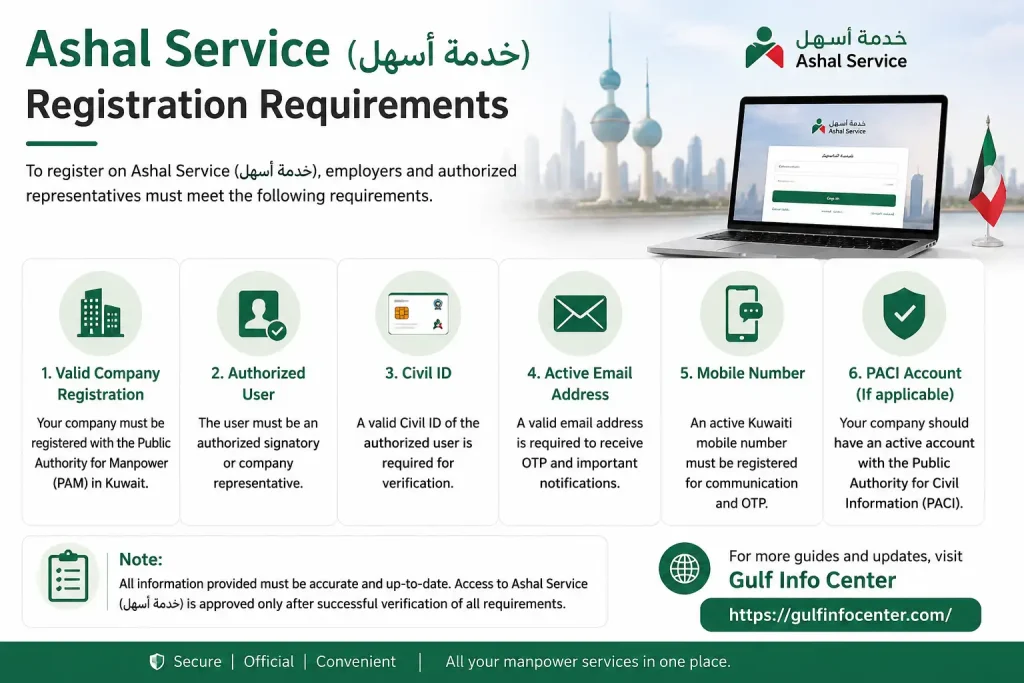
Information You May Need
The exact requirements can vary depending on the registration method and the service being requested. Employers may need to have the following information available:
One of the key steps is ensuring that the authorised signatory’s mobile number has been added to the company’s records through the required procedure. PAM indicates that this information must be registered before the Ashal registration process can be completed.
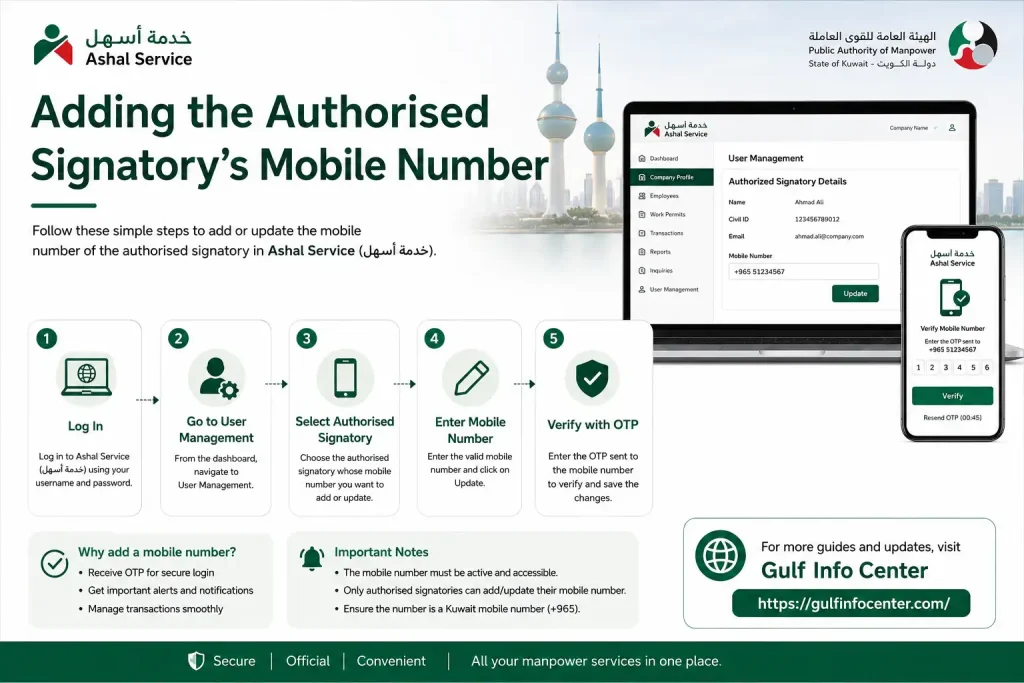
Adding the Authorised Signatory’s Mobile Number
According to PAM’s instructions, the authorised signatory must complete the applicable mobile-number form, sign it and submit it to the relevant Labour Department section that handles employer data and computer services.
After receiving the request, the authority reviews the information and enters the approved details into its electronic system. Once this step has been completed, Ashal registration can be carried out through the website. However, certain services may still require an original document to be submitted to a Labour Department.
Important: Requirements are not necessarily identical for every Ashal transaction. If a specific service instructs you to provide an original document, follow the document and submission requirements displayed for that transaction.
How to Register for Ashal Service(خدمة أسهل) in Kuwait
First-time users can create their access through the new Ashal Service(خدمة أسهل) portal. PAM’s registration instructions outline a straightforward process that begins with the company file details and authorised person’s Civil ID, followed by mobile verification and password creation.

Step 1: Visit the Official PAM Website
Go to the official Public Authority for Manpower (PAM) website and access the Ashal service. For security, use the official portal rather than login or registration links received from unknown or unofficial sources.

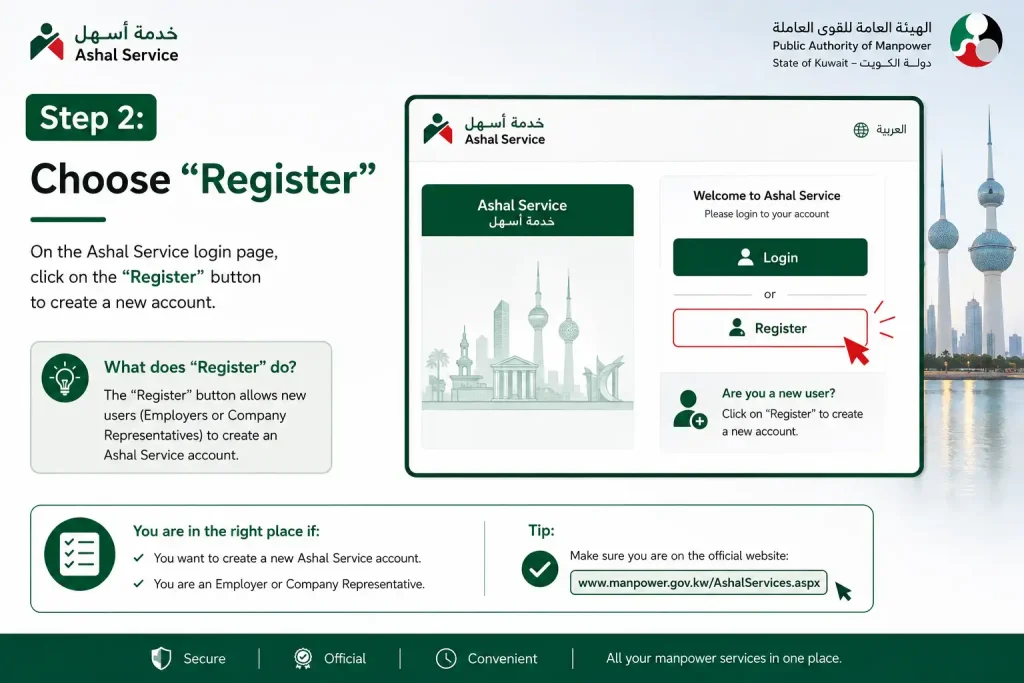
Step 2: Choose “Register”
Open the Ashal portal and select the Register option to start setting up access for a new user.
Step 3: Enter the Company File Number
Enter the company’s file number in the field provided by the portal.
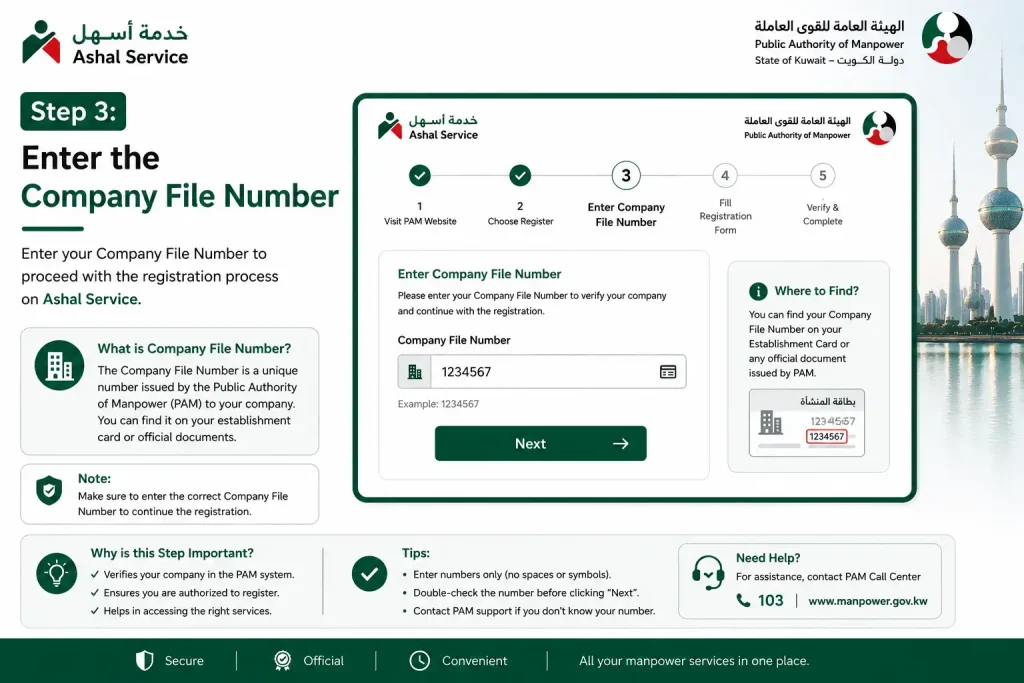
Step 4: Provide the Authorised Person’s Civil ID
Enter the Civil ID number belonging to the authorised person linked to the company file.
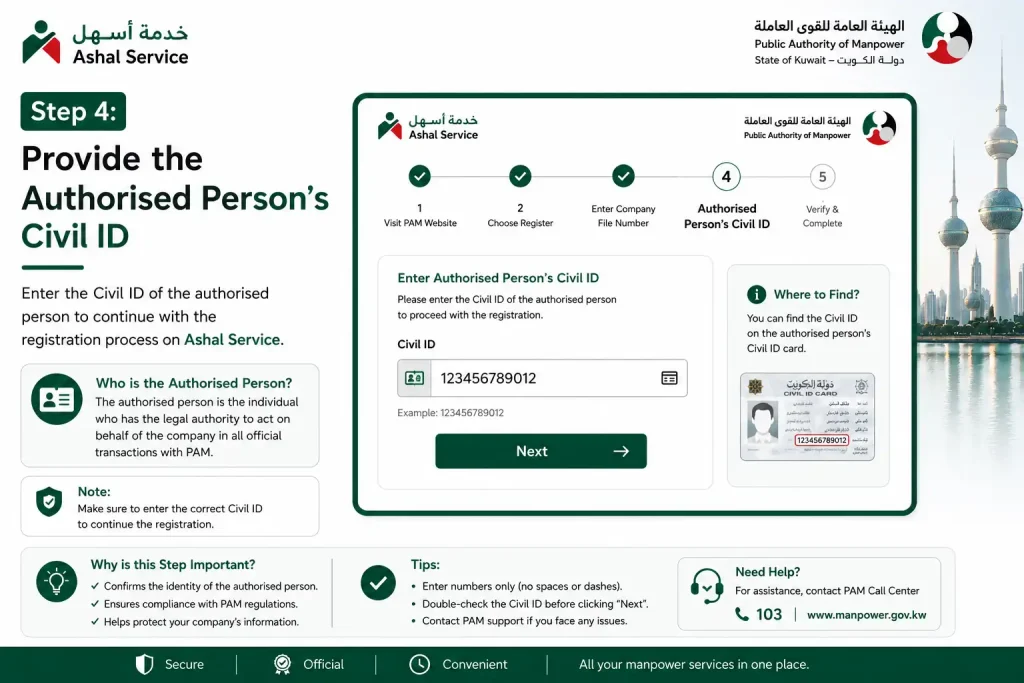
Step 5: Request the Verification Code
Proceed to the verification stage. A verification code will be sent to the authorised person’s registered mobile number.
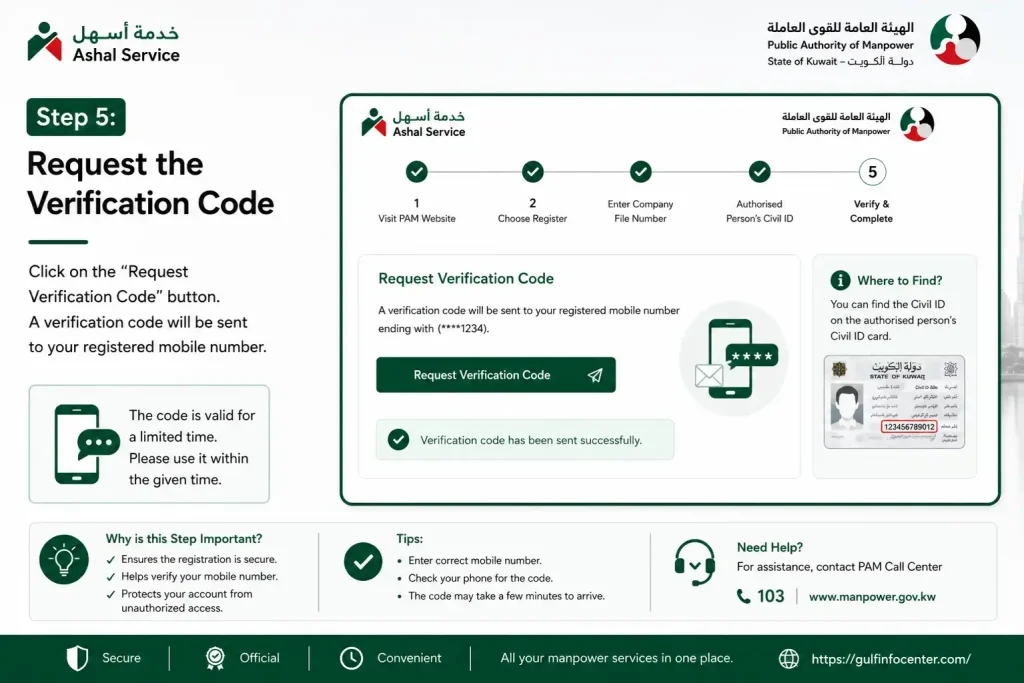
Step 6: Verify Your Mobile Number
Check the registered mobile phone, enter the verification code received and select the relevant verification option.
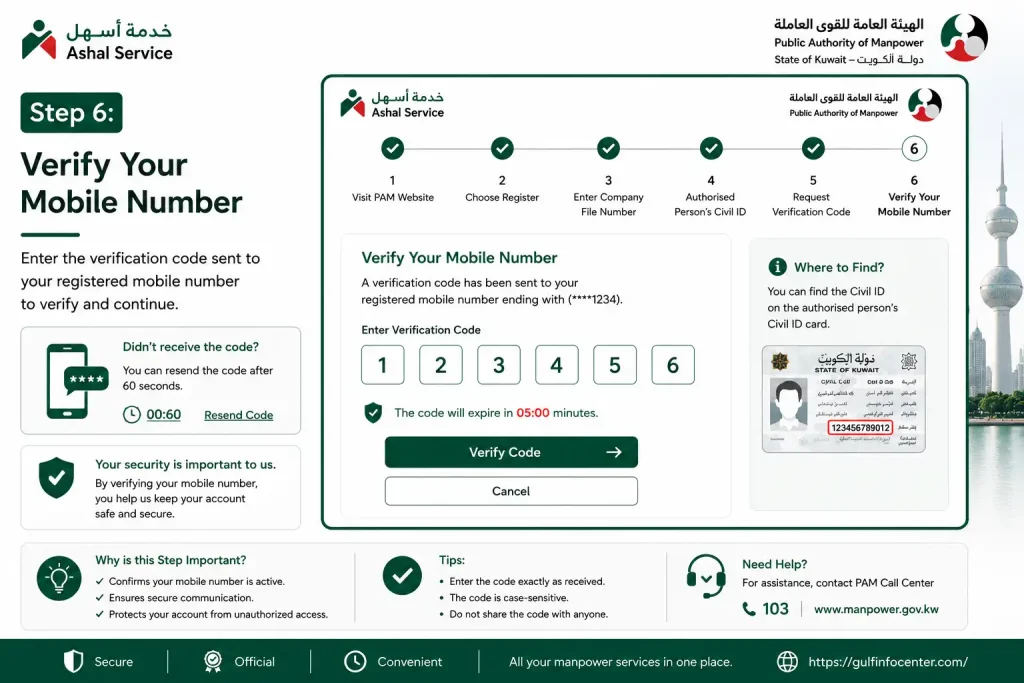
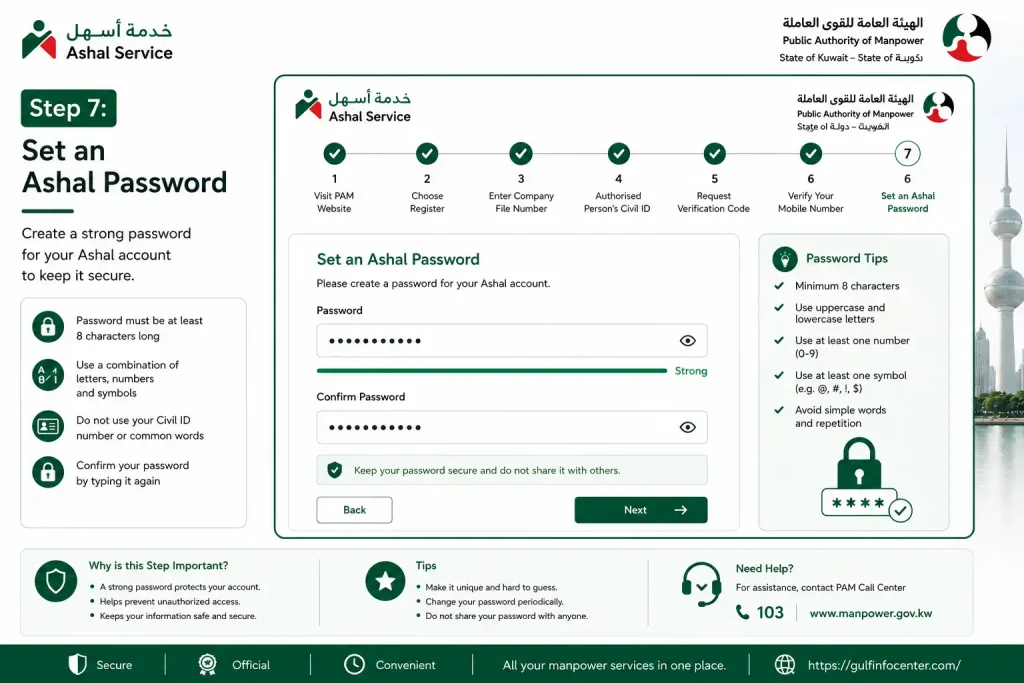
Step 7: Set an Ashal Password
Create a password for the new Ashal account by entering it in the required password field.
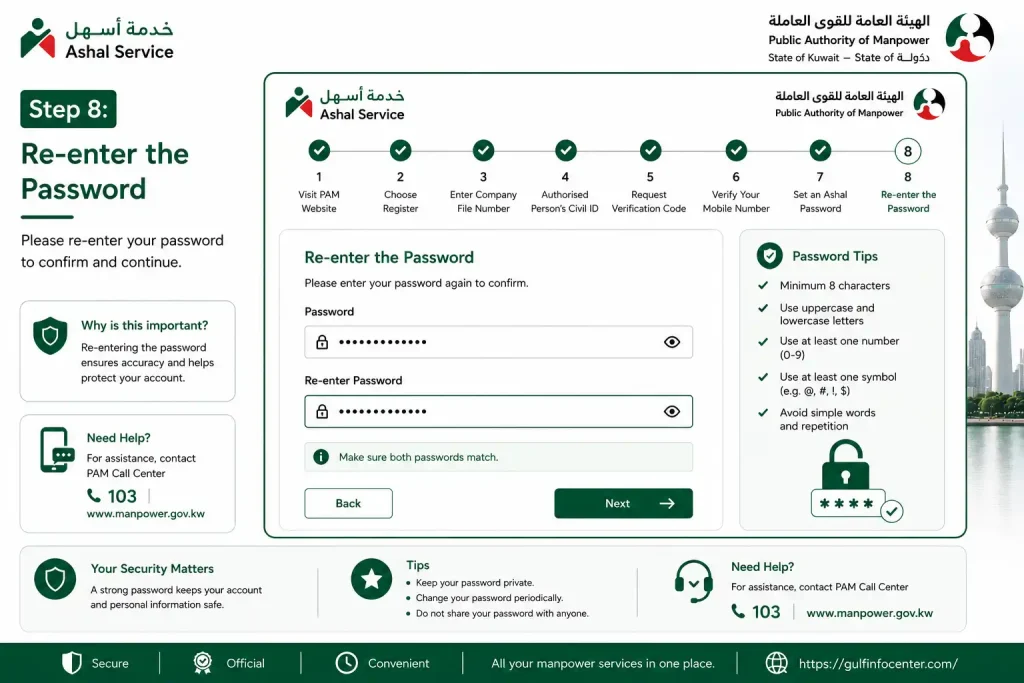
Step 8: Re-enter the Password
Type the same password again in the confirmation field to ensure both entries match.
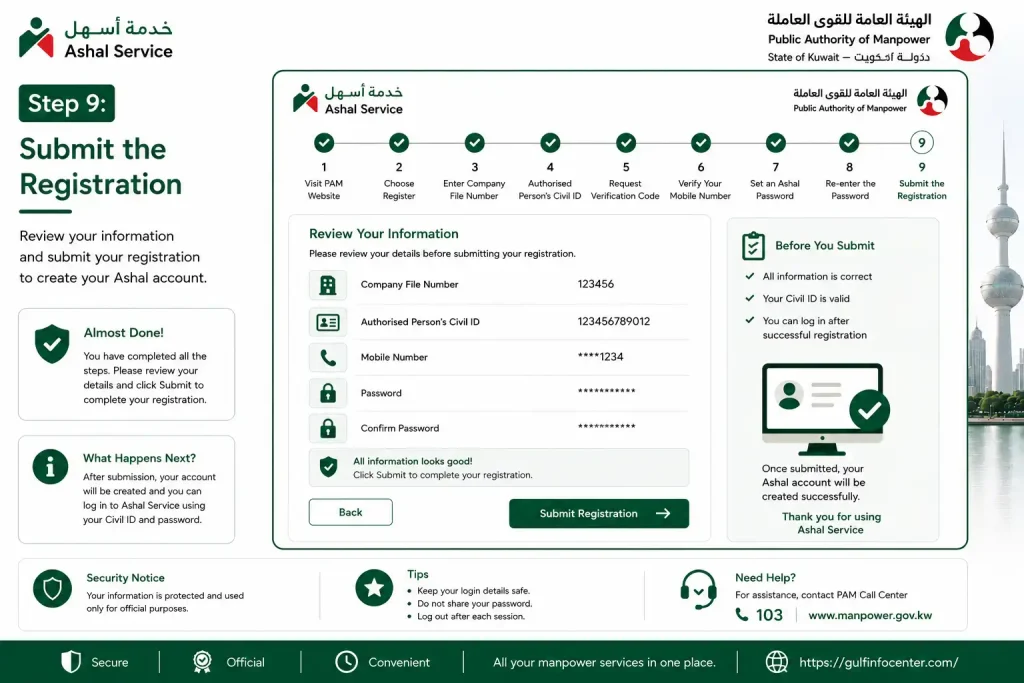
Step 9: Submit the Registration
Review the entered information and select Save to submit the registration request.
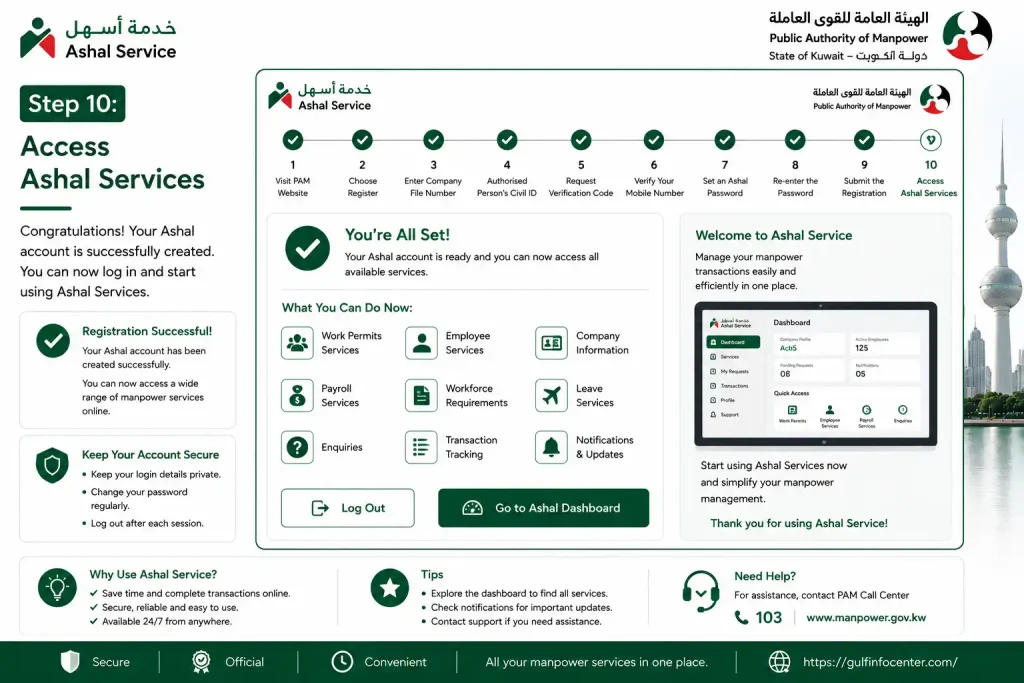
Step 10: Access Ashal Services
After successful registration, the user can access the Ashal portal and use the services and permissions available to the company.
PAM’s registration sequence: company file number → authorised person’s Civil ID → verification code → password creation → password confirmation → save registration.
Ashal Login: How to Access Your Employer Account
After completing registration, employers can sign in to Ashal Service (خدمة أسهل)through the official PAM portal. The login process requires the account credentials and any verification requested by the system.
Steps to Log In to Ashal
For safer access, start from PAM’s official Ashal page instead of using separate login links published by third-party websites.
Open the Official Ashal Service Page
Ashal Password and Account Recovery
Login problems can happen for several reasons, including an incorrect password, an issue with the registered mobile number or a verification-code problem.

Forgot Password
Use the password-reset functionality provided by the official Ashal portal.
Want to Change Your Password?
PAM lists password-change functionality among Ashal’s features, allowing users to update their credentials when required.
Verification Code Not Received
Check that:
If the issue continues, contact Ashal support rather than repeatedly creating new accounts.
Existing Ashal Users: Moving to the New Portal
Employers who already have an Ashal account from the previous portal can use the dedicated registration process for accessing the newer system. PAM indicates that existing users can register on the new portal using their previous Ashal login credentials.
How Previous Users Register on the New Ashal Portal(خدمة أسهل)
The process generally follows these steps:
If the new portal asks for any additional information or verification during the process, follow the instructions displayed by the official PAM system, as the requirements shown on the portal may determine the next step.
Ashal Subscription: How to Activate or Renew
Depending on their account and service access, Ashal users may need to activate a new subscription or renew an existing one. PAM’s published Ashal instructions cover both processes and indicate that the applicable payment is made through KNET before the transaction is submitted.
How to Activate a New Ashal Subscription
To start a new subscription:
According to PAM’s published Ashal instructions, a new subscription provides access for one year.
How to Renew an Ashal Subscription
If your existing subscription needs to be renewed, follow these steps:
Payment Note: Fees are not necessarily the same for every Ashal service. The amount and payment requirements depend on the specific transaction or service being requested.
Employer Services Available Through Ashal
Ashal Service(خدمة أسهل) gives employers access to a broad range of workforce and labour-related transactions through one electronic platform. PAM’s published service list covers areas such as national and expatriate workforce services, working hours, payroll files, employee leave, workforce requirements, licence details, contracts and work locations, absence reports and complaints.
Work Permit Services
The work-permit options available through Ashal vary according to the worker category and the type of transaction being requested.
Services for National Workers
For the national workforce, PAM’s Ashal service(خدمة أسهل) list includes:
Services for Expatriate Workers
For expatriate workers, the listed options include:
The services displayed for a particular employer may vary based on the company file, the worker’s status and the type of transaction being processed.
Payroll Services Available on Ashal(خدمة أسهل)
Payroll management is another area covered by the Ashal platform. PAM lists payroll-file upload as an available service, along with enquiry options for missing salary information and related payroll transactions.
Depending on the transaction, employers can use the relevant Ashal sections to:
If a payroll transaction has not been completed, check its current status and review any missing information displayed in the portal before submitting another request.
Employee Leave Services
Employers can also use Ashal for recording and checking employee leave information. PAM’s published service list includes the following options:
These services allow employers to enter and review relevant leave records electronically.
Workforce Requirement Services
Ashal also provides services related to workforce requirements, which are useful when employers need to manage their staffing requirements. PAM’s published list includes:
The appropriate option depends on whether the employer is making a new request, updating an existing requirement or applying for its renewal.
Before You Submit a Workforce Request
Keep the relevant company and licence information available before beginning the transaction. Where supporting documents are required, prepare the necessary files in advance.
Requirements for documents, attachments or approvals may differ between transactions. For the most accurate requirements, follow the instructions displayed within the official Ashal service for the specific request.
Company, Licence and Workplace Services
Ashal is not limited to individual workers. PAM also lists several company and workplace-related services.
These include:
These services can be particularly useful for HR teams and company representatives who need to maintain employer records electronically.
Worker Absence and Complaint Services
Employers can also use Ashal for certain absence and labour-complaint functions.
The official service list includes options for:
The exact option should be selected according to the worker’s record and the type of transaction displayed by the portal.
How to Check an Ashal(خدمة أسهل) Transaction
Employers can use the enquiry features available in Ashal Service(خدمة أسهل) to check submitted transactions and review related company or workforce information. The exact enquiry option depends on the type of information or transaction being checked.
Steps to Check an Ashal Transaction
1. Sign in to Your Ashal Account
Log in using your registered employer username and password.
2. Open the Relevant Enquiry Section
Go to the enquiry area that relates to the transaction or information you want to review.
3. Select the Transaction You Want to Check
Choose the appropriate service, such as a payroll submission, employee leave record, complaint or another available enquiry.
4. Provide the Requested Information
Enter the details required by the portal so Ashal can find the relevant transaction or record.
5. Review the Available Result
Check the information displayed, including the transaction status and any other available details.
6. Save the Record if Needed
If the portal provides an option to print or download the result, keep a copy for your company records.
What Can Employers Check?
PAM’s published Ashal services(خدمة أسهل) include several enquiry functions covering areas such as:
The available enquiry options can depend on the employer’s account and the transaction being processed, so use the relevant option shown within the Ashal portal.
Ashal Payment and KNET
Electronic payment is one of the features associated with Ashal. PAM’s subscription instructions specifically state that KNET is used for new subscription activation and renewal.
However, employers should distinguish between subscription payments and payments associated with individual services.
If a Payment Is Required
If a payment fails, do not immediately repeat the transaction without checking whether the first attempt was recorded. Review the transaction status first.
Common Ashal Problems and What Employers Should Check
Employers may occasionally encounter issues while registering, signing in or submitting transactions through Ashal Service(خدمة أسهل). In most cases, the first step is to check the company details, authorised-user information and requirements shown for the specific service.
Ashal OTP or Verification Code Is Not Arriving
Check the mobile number registered to the authorised person first. Ashal’s registration process relies on the verification code being sent to the mobile number associated with the authorised user.
The Civil ID Is Not Accepted
Make sure the Civil ID entered belongs to the authorised person linked to the company file. If the company information is no longer up to date, the relevant details may need to be updated through the appropriate PAM procedure.
The Company File Is Not Recognised
Recheck the company file number entered in the portal. Also confirm that the company information matches the details of the authorised person using the service.
Ashal Login Is Not Working
Start by checking the username and password you entered. If you cannot remember the password, use the official password-reset option provided through Ashal.
An Ashal Transaction Is Still Pending
Open the relevant enquiry or transaction-status section and check the latest information displayed by the portal. If the transaction requires supporting documents, confirm that all requested attachments have been submitted.
PAM states that transactions involving attachments may be approved within 24 hours, subject to the applicable regulations. However, employers should check the status of their individual transaction rather than assuming that every Ashal service follows the same processing period.
A Document or Attachment Has Been Rejected
Check the requirements displayed for the particular service and make sure the submitted document meets them. Some Ashal transactions may also require an original document to be submitted to a Labour Department.
Ashal Customer Support in Kuwait
When an employer is unable to register, access an account or complete an Ashal transaction, PAM provides dedicated support information for the service.
Official Ashal Contact Details
These contact details are provided on PAM’s official Ashal service page.
When contacting support, it can be useful to include relevant information such as:
For electronic enquiries, employers can also use PAM’s official Ashal enquiries service.
Ashal Service Enquiries – Official PAM
Ashal Service(خدمة أسهل) vs Traditional Employer Transactions
For Kuwait employers, one of the key benefits of Ashal Service(خدمة أسهل) is the ability to manage many manpower-related procedures electronically rather than handling every routine transaction through traditional channels. PAM’s published Ashal service categories cover a broad range of employer and workforce requirements.
| Employer Requirement | Ashal Availability |
|---|---|
| National workforce transactions | Available |
| Expatriate workforce transactions | Available |
| Work-permit services | Available |
| Payroll-file submission | Available |
| Employee leave services | Available |
| Workforce requirement services | Available |
| Licence information | Available |
| Contracts and work locations | Available |
| Absence reports | Available |
| Labour complaints | Available |
| Transaction enquiries | Available |
| Electronic payment | Available for applicable transactions |
The table reflects the service categories and enquiry functions listed by PAM for Ashal.
Employer Checklist Before Using Ashal(خدمة أسهل)
A little preparation can help prevent avoidable issues when submitting an important transaction through Ashal. Before you begin, make sure you have:
Checking these details beforehand can make the submission process smoother and give you the information needed to follow up if the transaction requires additional action.
FAQs
Final Thoughts
Ashal Service (خدمة أسهل) provides Kuwait employers and authorised company representatives with a convenient digital way to manage many Public Authority for Manpower (PAM) services, including work permits, payroll files, employee leave, workforce requirements, company records, absence reports and transaction enquiries. To avoid delays, employers should keep their company information, authorised person’s Civil ID, registered mobile number and account credentials up to date and carefully check the requirements, documents and fees for each transaction before submitting it. If registration, login, verification or transaction issues occur, users should rely on PAM’s official Ashal support channels and the information shown on the official portal, as procedures and requirements may change over time. Overall, Ashal Service (خدمة أسهل) offers a practical and efficient way for Kuwait employers to handle eligible labour-related procedures online while reducing unnecessary paperwork and routine visits to PAM offices.


