MOHRE UAE 2026: Login, Enquiry, Work Permits, WPS & Labour Services

Managing employment procedures in the UAE can be challenging when you need to handle work permits, employment contracts, wage payments, complaints, and application tracking. The Ministry of Human Resources and Emiratisation (MOHRE) provides digital services that bring many of these labour-related processes together for employers, employees, establishments, and authorised representatives. In 2026, users can access uae app through its official website, smart application, service centres, and other approved channels, with login options such as credentials or UAE Pass depending on the service. This guide covers essential UAE services, including login, transactions enquiry, work permits, permit renewal and cancellation, employment contract checks, WPS, labour complaints, application status, mobile services, fees, technical support, and common questions.

MOHRE UAE at a Glance

ServiceWhat it is used for
MOHRE LoginAccess eligible online labour services
Transactions EnquiryFollow submitted applications and transactions
Work PermitApply for eligible work permits
Permit RenewalRenew an existing work permit
Permit CancellationCancel an eligible permit or employment contract
Employment ContractCheck employment offer and contract information
WPSSupport electronic wage-payment compliance
Labour ComplaintSubmit eligible employment disputes
Establishment ServicesHandle company-related labour procedures
Work BundleManage integrated employee and business procedures

The service available to you depends on factors such as your role, establishment, employment arrangement, worker category, and the transaction you are trying to complete. MOHRE requirements are not identical across every service.

What Does MOHRE Mean?

MOHRE stands for the Ministry of Human Resources and Emiratisation. It is the UAE government ministry responsible for a range of private-sector employment and labour-market services.

Through its digital channels, eligible users may deal with matters such as:

  • Work permits
  • Employment contracts
  • Work permit renewals
  • Permit and contract cancellations
  • Labour transactions
  • Employer services
  • Employee services
  • Labour complaints
  • Wage Protection System (WPS)
  • Establishment procedures
  • Employment offers
  • Transaction enquiries
  • Workforce-related services

One important point is often overlooked: the same process does not apply to every worker or employer. The correct procedure can change according to the worker’s category, establishment status, profession, and type of service.

How to Apply for a MOHRE Work Permit

Step 1: Confirm That the Establishment Can Apply

The employer should first check whether the establishment meets the requirements for the relevant work-permit service.

For the overseas work-permit process described in the source, the establishment needs an available electronic quota and a valid licence without relevant violations that would prevent operations.

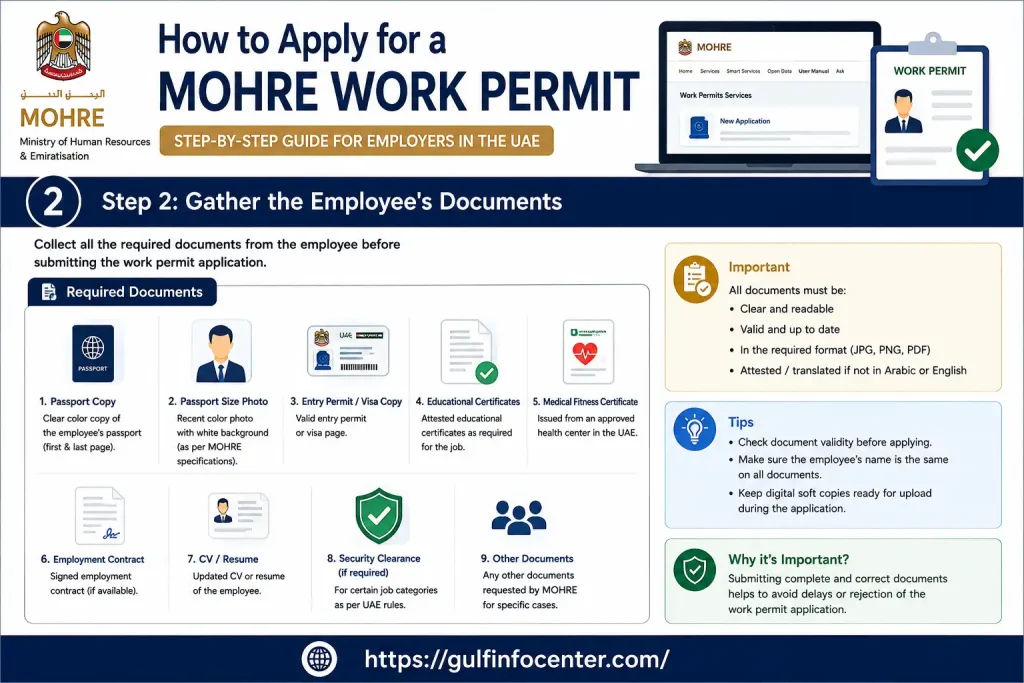
Step 2: Gather the Employee’s Documents

Prepare the documents before beginning the online application.

At minimum, check that the passport, photograph, job offer, qualifications, and any profession-specific documents meet the requirements for the selected work-permit category.

Doing this before starting the application reduces the risk of stopping halfway through the process.
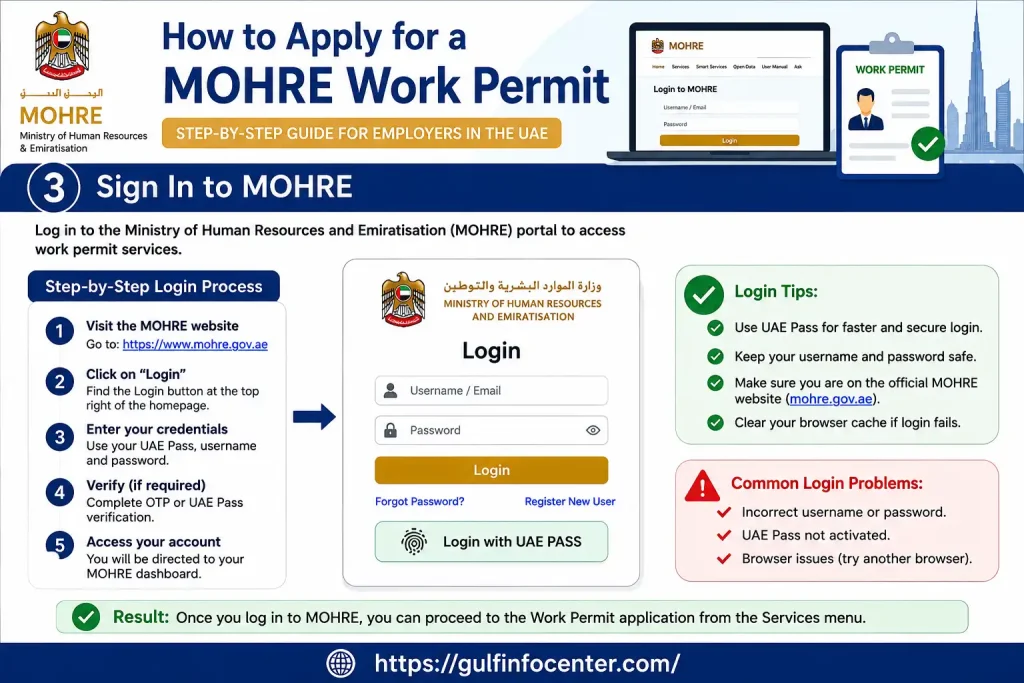
Step 3: Sign In to MOHRE

Access the MOHRE website or approved smart channel.

Use the authentication method available for the service, such as MOHRE credentials or UAE Pass.
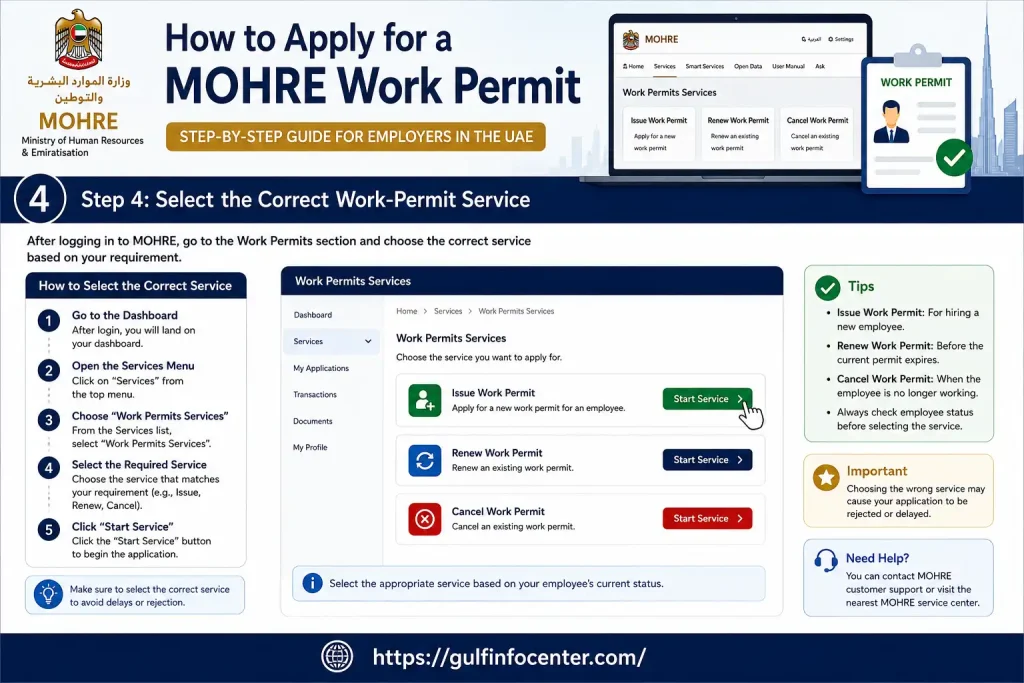
Step 4: Select the Correct Work-Permit Service

Open the work-permit section and identify the service matching the worker’s situation.

For a person being recruited from outside the UAE, select the relevant New Work Permit – Overseas service.

Selecting the wrong category can create unnecessary delays, so do not choose a service simply because its name looks similar.
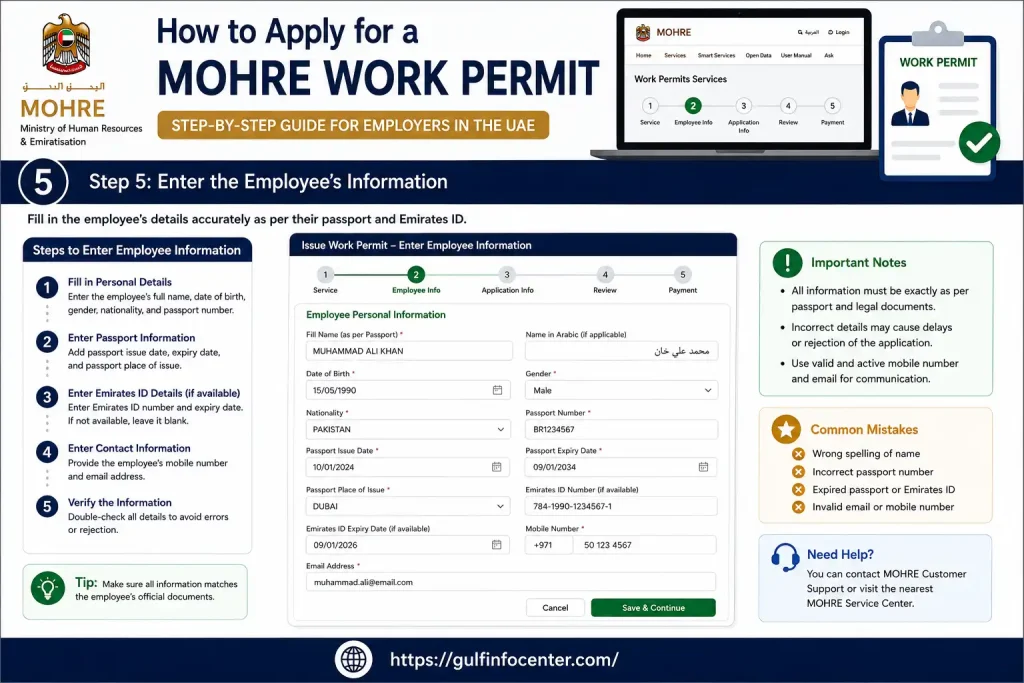
Step 5: Enter the Employee’s Information

Enter the worker’s details carefully.

Typical information includes:

  • Full name
  • Passport details
  • Nationality
  • Date of birth
  • Profession
  • Employment information

Every entry should match the official documents. Even small differences in names or identification details can create problems later.
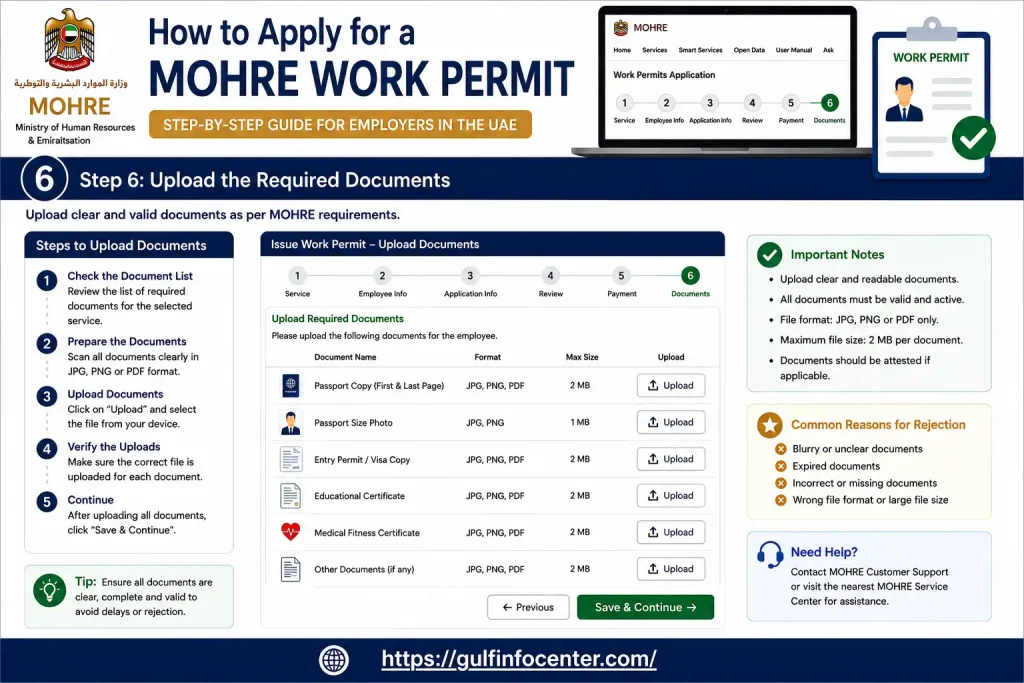
Step 6: Upload the Required Documents

Upload each document requested by the system.

Make sure scans and photographs are:

  • Clear
  • Complete
  • Readable
  • Correct for the selected employee

Poor-quality or incomplete files can result in delays or requests for additional information.
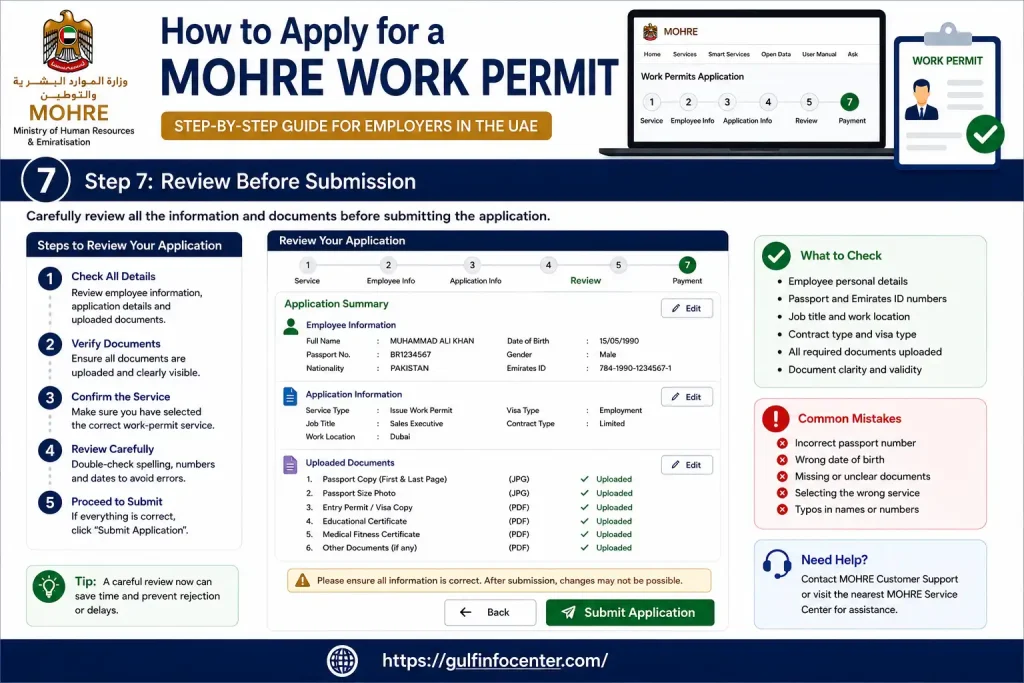
Step 7: Review Before Submission

Do not rush through the final screen.

Check:

  • Employee details
  • Passport information
  • Job information
  • Establishment information
  • Uploaded documents

Correct errors before submitting.

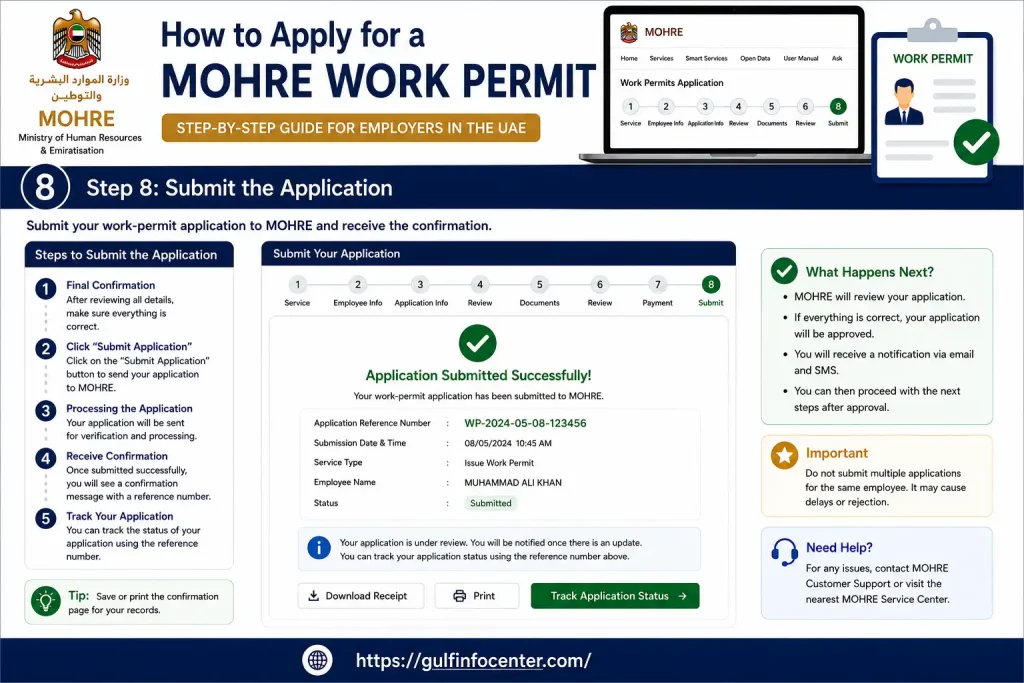
Step 8: Submit the Application

Once everything is accurate, submit the application through the available channel.

After submission, the request enters the relevant review process.
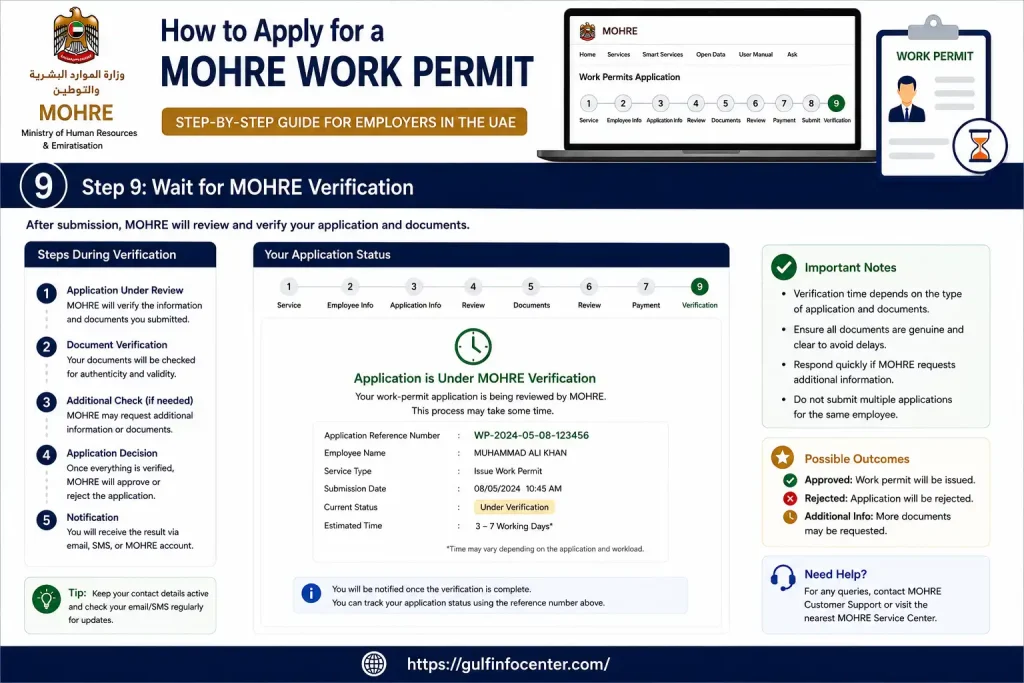
Step 9: Wait for MOHRE Verification

electronically reviews the application against the applicable requirements and documentation.

The application may not be completed immediately. Processing depends on the requirements being satisfied.
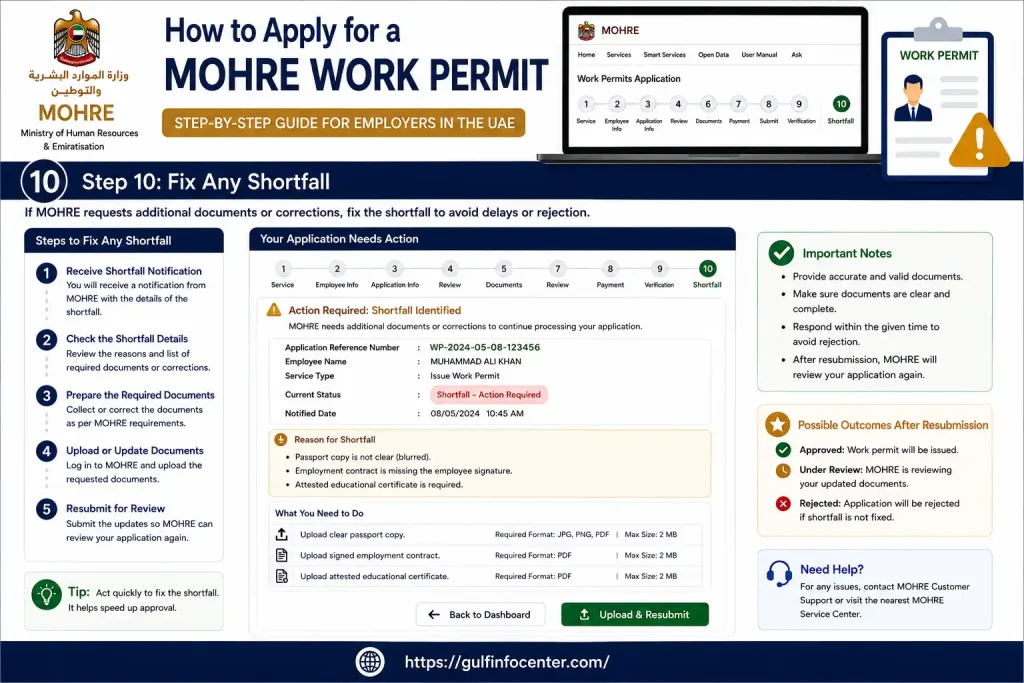
Step 10: Fix Any Shortfall

If identifies missing information or documentation, the establishment should provide what is requested.

Do not create a duplicate application just because the original request requires additional information.
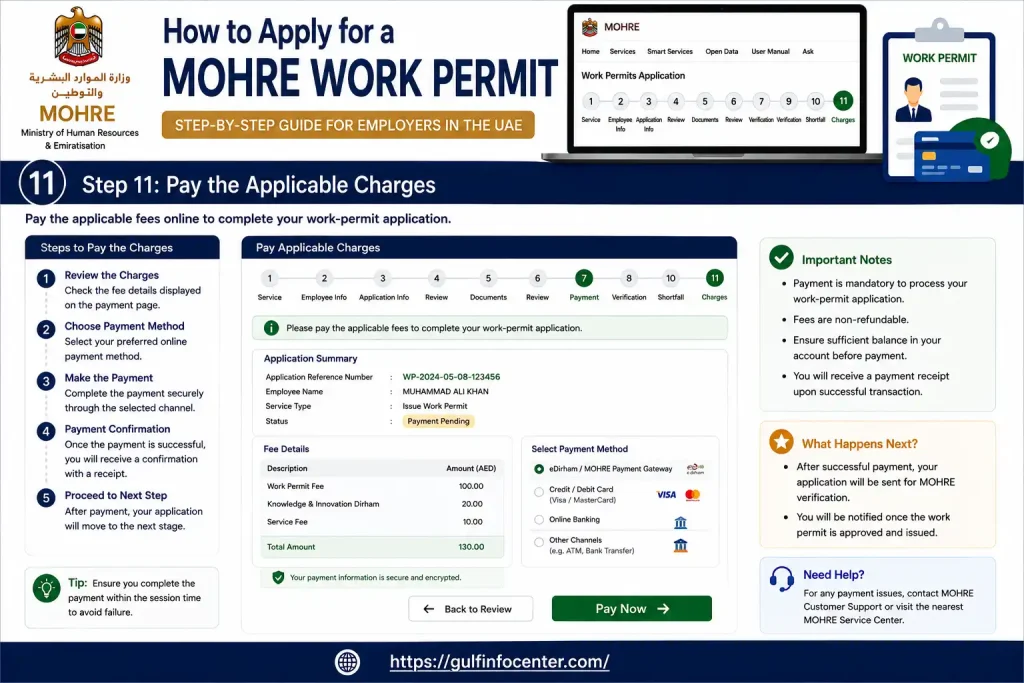
Step 11: Pay the Applicable Charges

Once the application reaches the appropriate stage and the relevant requirements are fulfilled, applicable federal fees and, where relevant, bank guarantee or insurance requirements may become payable.

Fees vary according to establishment category and service type, so check the current official service information rather than relying on a generic fee figure.
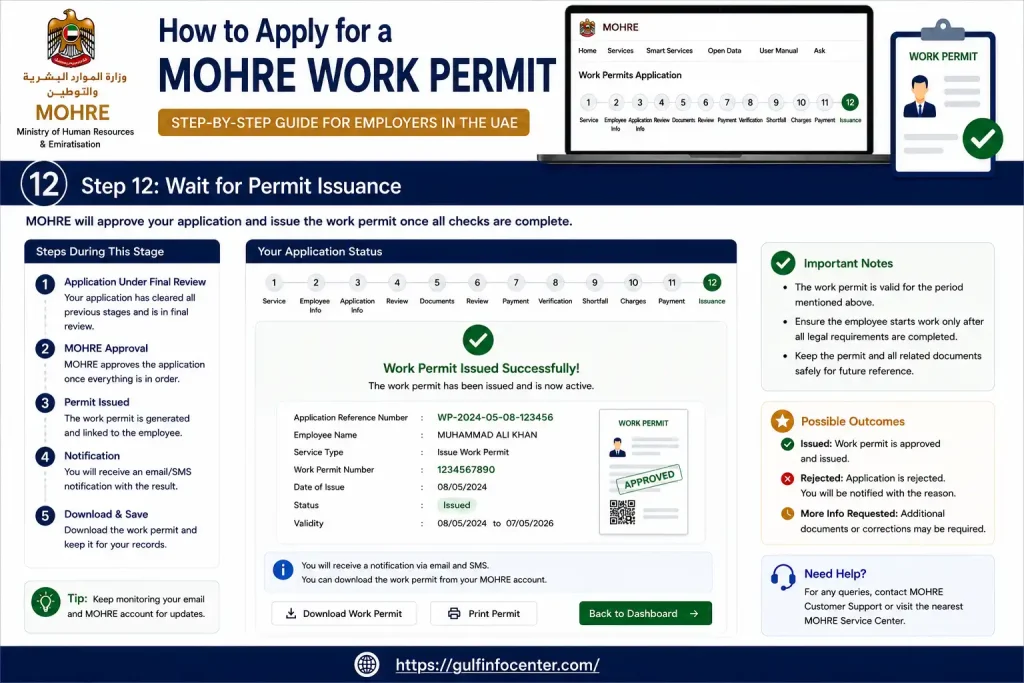
Step 12: Wait for Permit Issuance

After the required conditions and documentation have been completed, the work permit can be issued.

For the overseas work-permit service described in the source, lists a 2-working-day service completion duration, provided the applicable requirements have been fulfilled.
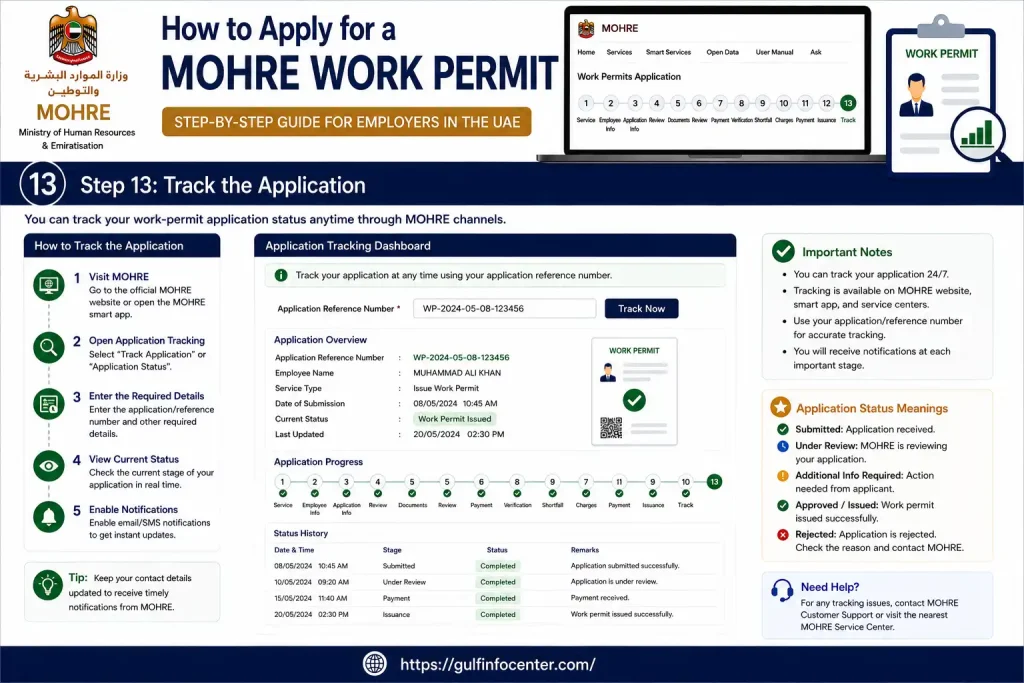
Step 13: Track the Application

After submission, use the MOHRE enquiry facility to monitor the transaction.

This is important because a request may stop progressing if additional information or action is required.
MOHRE Login 2026: How to Access Your Account

MOHRE login gives eligible users access to the online services available for their account. Depending on the service and channel, authentication may be completed using a username and password or UAE Pass.

Step 1: Go to the Official MOHRE Website

Open the official MOHRE website in a secure, supported browser.

Before entering your information, check the domain carefully. The official domain is .gov.ae. This matters because unofficial websites can imitate government portals and may attempt to collect login or personal information.

Step 2: Locate the Sign-In Area

Look for the login or sign-in option on the MOHRE website.

The exact position and appearance of the login option can change as the government portal is updated, so focus on the official sign-in function rather than relying on an old screenshot or third-party tutorial.

Step 3: Select the Available Authentication Method

The system may provide different ways to authenticate your account.

Depending on the service, you may see options such as:

  • MOHRE username and password
  • UAE Pass
  • Another authentication method supported by the relevant service

If UAE Pass is available, select it and continue with the authentication instructions shown on screen.

Step 4: Verify Your Identity

If you choose UAE Pass, complete the authentication request according to the instructions displayed.

For traditional MOHRE credentials, enter your registered username and password carefully. Avoid sharing these credentials with another person.

Step 5: Enter Your Account Area

After successful authentication, will provide access to the services available for your account.

Depending on your account type, the dashboard may include areas related to:

  • Applications
  • Work permits
  • Employees
  • Contracts
  • Establishment services
  • Transactions
  • Enquiries
  • Other labour services

Step 6: Open the Service You Actually Need

Once logged in, select the relevant service instead of creating a new transaction unnecessarily.

For example, if you have already submitted an application and only want to know what happened to it, use the Transactions Inquiry Service rather than submitting the same application again.

Important: Never give your MOHRE password, UAE Pass approval, or OTP to an unknown person claiming they can “speed up” your application.

How to Check MOHRE Application Status Online

1. Open MOHRE Services

Visit the official MOHRE website and access the relevant services area.

2. Find Transactions Inquiry

Open the Transactions Inquiry Service.

This is the appropriate place to track an existing transaction rather than creating another request.

3. Provide the Requested Details

Enter the information requested by the enquiry system.

Depending on the transaction, this can include a transaction number or another reference number.

4. Complete Security Verification

If the page displays a CAPTCHA or verification code, complete it exactly as shown.

5. Submit the Search

Select the relevant search, enquiry, or submit option.

6. Read the Current Status

The system should display the available transaction information.

The result can help you determine whether your application is:

  • Still under processing
  • Waiting for additional information
  • Subject to another action
  • Completed

7. Deal With Any Shortfall

If identifies missing information or documents, do not ignore the requirement.

Provide the requested information through the appropriate MOHRE channel.

also identifies its website, smart application, call centre, and chatbot as channels that may be used for relevant follow-up.

MOHRE Work Permit Application 2026

A work permit is not a single universal process. has different work-permit services for different worker situations, including overseas recruitment, temporary work, Golden Visa holders, UAE nationals/GCC citizens, and other categories.

That distinction is important. Do not copy the procedure for one work-permit category and assume it applies to another.

For an overseas worker, the relevant service is designed for establishments seeking to recruit or employ a person from outside the UAE.

Requirements for an Overseas Work Permit

Before applying, the employer should prepare the documents required for the specific category.

The source material identifies documents such as:

  • Clear colour photograph with a white background
  • Passport copy with at least six months’ validity
  • Official MOHRE job offer signed by the employer and employee
  • Required academic certificate, where applicable
  • Professional licence for regulated professions, where applicable
  • Additional nationality-specific documents where required

The exact document list can change according to the worker’s profession and category.

MOHRE Work Permit Renewal

Employers can use services to renew eligible existing work permits.

A typical renewal flow includes:

  • Sign in to the MOHRE system.
  • Open the relevant renewal service.
  • Select the employee.
  • Review the employee information already available.
  • Provide any documents requested by the system.
  • Pay applicable charges.
  • Submit the renewal request.
  • Allow MOHRE to review the request.
  • Respond to any reported shortfall.
  • Check the final transaction status.

The exact requirements depend on the permit and employment category.

How to Cancel a MOHRE Work Permit

When employment ends or another eligible situation occurs, an employer may need to cancel the employee’s work permit and employment contract.

The cancellation request is submitted through the available channel and can be returned for correction if the ministry identifies missing information.

MOHRE Work Permit Cancellation Steps

Step 1: Access Your MOHRE Account

Sign in through the MOHRE website or approved smart application.

Step 2: Open the Cancellation Service

Select the service relating to cancellation of the work permit and employment contract.

Step 3: Choose the Employee

Identify the worker whose permit needs to be cancelled.

Step 4: Prepare Supporting Documents

Depending on the situation, may request a ministry-issued cancellation form and other supporting documentation.

Step 5: Confirm Applicable Employee Rights

The employer may need to provide a statement confirming that the worker’s applicable dues, rights, and entitlements have been settled.

Step 6: Submit the Request

Review the details and submit the cancellation application.

Step 7: Respond to Any Shortfall

If requests additional information, provide it through the appropriate service channel.

Step 8: Complete the Cancellation

Once all applicable requirements have been satisfied, the permit and/or contract cancellation can be approved.

How to Check a MOHRE Employment Contract

Employees can use MOHRE’s electronic services to check available employment offer and contract information.

The employment offer enquiry service can request information such as:

  • Transaction number
  • Passport number
  • Nationality
  • Date of birth
  • CAPTCHA

When the required details are entered correctly, the service can display the available employment offer or contract information.

Contract Check Procedure

  • Open the official MOHRE employment offer or contract enquiry service.
  • Select the relevant enquiry option.
  • Enter the transaction number.
  • Provide the passport number.
  • Select the nationality.
  • Enter the date of birth.
  • Complete the CAPTCHA.
  • Submit the enquiry.
  • Review the contract information shown by the system.
  • Save or download the PDF if that option is provided.

This is particularly useful when you need to confirm the information recorded in an employment offer or contract rather than relying only on a paper copy.

WPS UAE 2026: What Is the Wage Protection System?

The Wages Protection System (WPS) is an electronic wage-payment framework used in the UAE labour market.

It facilitates wage payments through approved banks, financial institutions, and exchange houses. Private-sector establishments are required to pay workers according to the employment arrangement through the applicable wage-payment system.

MOHRE has also introduced an upgraded WPS version in cooperation with the Central Bank of the UAE, Al Etihad Payments, and accredited financial institutions.

Why WPS Matters

For employers, WPS can help with:

  • Electronic wage processing
  • Maintaining salary-payment records
  • Meeting applicable wage-payment requirements
  • Reducing manual salary-payment processes
  • Monitoring wage compliance

For employees, WPS is relevant when checking whether wages are being paid through the required channels and according to the employment arrangement.

How WPS Payments Generally Work

The process can be understood as a series of connected stages:

  • The employer prepares payroll information.
  • Salary information is processed through the approved system.
  • The wage file or payment instruction is submitted through the relevant financial channel.
  • The financial institution processes the payment.
  • Employees receive their wages through the applicable approved channel.
  • Wage-payment information remains available for compliance and monitoring.

The precise workflow can vary according to the employer’s banking arrangements, payroll system, and applicable WPS procedures.

MOHRE Labour Complaint: How to Submit a Dispute

MOHRE provides channels for eligible employees and employers dealing with workplace disputes.

Many labour disputes may be resolved amicably, while some matters can move into formal legal processes depending on the circumstances and applicable law.

What Should You Prepare Before Filing?

Collect the information and evidence connected with your dispute, such as:

  • Emirates ID details
  • Work permit information
  • Employment contract
  • Employer information
  • Salary records
  • Relevant messages or correspondence
  • Supporting documents
  • Transaction or reference numbers

Having the evidence ready makes the complaint easier to explain and reduces unnecessary back-and-forth.

Steps to File a MOHRE Labour Complaint

Step 1: Collect the Evidence

Gather the documents that prove what happened.

Do not rely only on memory. Keep contracts, salary records, notices, correspondence, and other relevant evidence together.

Step 2: Open the Official Complaint Channel

Use the appropriate labour-dispute service.

Step 3: Verify Your Identity

The system may request identification and contact information before allowing you to proceed.

Step 4: Explain the Problem Clearly

Describe the dispute using facts rather than an emotional narrative.

Include:

  • What happened
  • When it happened
  • Which right or payment is disputed
  • What evidence supports your position
  • What outcome you are requesting

Step 5: Attach Supporting Evidence

If the system requests documents, upload relevant evidence such as:

  • Employment contract
  • Salary records
  • Notices
  • Official correspondence
  • Other dispute-related documents

Step 6: Submit the Complaint

Review the information before sending the complaint.

Step 7: Keep the Reference Number

Save the complaint or transaction reference and use the appropriate channel to monitor its progress.

MOHRE Technical Support for Website Problems

Not every problem is a labour problem. Sometimes the issue is simply technical.

MOHRE provides a technical-support channel where customers can describe the problem, provide reference information, and attach screenshots or error messages.

When reporting a technical issue, prepare:

  • Name
  • Email address
  • Mobile number
  • Service name
  • Reference number
  • Clear description of the problem
  • Screenshot of the error
  • Relevant supporting documents

If a page repeatedly fails, refreshing it again and again is not a solution. Identify the error, collect the relevant reference number, and use the official support process.

Why Is My MOHRE Application Status Not Updating?

A status that has not changed does not automatically mean the application has failed.

Possible reasons include:

  • The application is still being reviewed
  • A document is missing
  • Information is incorrect
  • Payment has not been completed
  • Employer action is required
  • Government verification is still pending
  • A technical problem is affecting the transaction
  • Additional approval is required

What to Do If the Status Is Stuck

Start with the official Transactions Inquiry Service.

If the system reports a shortfall, correct it first. If nothing is required but the transaction remains unresolved, use official support channels rather than submitting multiple applications for the same matter.

Duplicate applications create confusion; they do not automatically accelerate processing.

MOHRE UAE Mobile App

MOHRE also offers a mobile application through which employers and employees may access eligible labour services.

Depending on account type and service availability, the app may provide access to:

  • Labour services
  • Applications
  • Enquiries
  • Transaction tracking
  • Other employment-related procedures

Only install the official application. Avoid unofficial APK files and websites that claim to provide modified or faster versions of government applications.

What Is the MOHRE Work Bundle?

The UAE’s Work Bundle is designed to bring several employee and business-management procedures together within an integrated platform.

MOHRE describes the Work Bundle as covering areas such as new employee onboarding and work-permit-related procedures. For employers, the integrated approach can reduce the need to manage multiple separate processes manually.

The available workflow still depends on the employee and establishment category. Employers should therefore check the current Work Bundle and instructions before starting a transaction.

MOHRE Fees 2026: How Much Does It Cost?

There is no single fee that applies to every service.

Charges can vary according to:

  • Service type
  • Establishment category
  • Worker category
  • Work-permit type
  • Emirate
  • Government charges
  • Collection charges
  • Business-centre charges
  • Other applicable requirements

For example, the overseas work-permit service in the source lists a AED 50 federal work-permit application fee, along with different two-year issuance fees for establishment categories 1, 2, and 3.

Do not rely on one generic fee figure.

This is a common mistake in online guides. A fee that applies to one work-permit category or establishment class may not apply to another.

Always check the amount displayed for the exact service you are applying for before making payment.

Documents You May Need for MOHRE Services

The required documents depend on the service, but common examples include:

  • Passport copy
  • Passport-size photograph
  • Emirates ID
  • Employment contract
  • Official job offer
  • Academic certificate
  • Professional licence
  • Work-permit details
  • Establishment information
  • Transaction number
  • Supporting evidence
  • Signed forms

For an overseas work permit, the source specifically identifies a passport with at least six months’ validity, a clear photograph, and an official signed job offer among the required documents.

Before uploading anything

Check the document quality and make sure the information matches the application. A clear document with incorrect information is still a problem.Common Login and Account Problems

Incorrect Username or Password

Check the credentials you entered and use the available account-recovery option if the service provides one.

UAE Pass Authentication Fails

Confirm that your UAE Pass account is active and that you are completing the authentication request correctly.

OTP Does Not Arrive

Check the registered mobile number and your network connection. If the problem continues, use the official support route.

Application Cannot Be Found

Review the transaction or reference number you entered. One incorrect digit can prevent the system from locating the record.

MOHRE Website Is Not Loading

Try the following:

  • Refresh the page
  • Clear the browser cache
  • Use another supported browser
  • Check your internet connection
  • Try the official MOHRE mobile application

If the issue continues, report it through technical support rather than repeatedly attempting the same failed action.

7 Things to Check Before Using MOHRE

1. Verify the Website

Use the official mohre.gov.ae domain and be careful with websites that imitate government portals.

2. Protect Your Login Information

Never share your:

  • OTP
  • UAE Pass approval
  • Password
  • Other authentication information

with unknown individuals.

3. Save the Transaction Number

Once you submit an application, keep its reference or transaction number. You may need it later to check the status.

4. Match Your Documents

Check names, passport numbers, dates of birth, employment information, and other important details before submission.

5. Avoid Duplicate Applications

If your application is pending, check the existing transaction first. Starting another application does not guarantee faster processing.

6. Use the Correct Service

has multiple work-permit and labour services. Requirements for one category should not be assumed to apply to another.

7. Check Current Requirements Before Payment

Fees, documents, and service requirements can depend on the exact transaction. Confirm the details on the applicable official service page.

FAQs

No. MOHRE does not directly cancel your UAE residency visa. The Ministry of Human Resources and Emiratisation (MOHRE) is responsible for employment-related matters such as work permits and labour contracts. Residency visa cancellation is handled by the relevant immigration authority, such as the General Directorate of Residency and Foreigners Affairs (GDRFA) in Dubai or the Federal Authority for Identity, Citizenship, Customs and Port Security (ICP) for other emirates.

That does not mean MOHRE is irrelevant. In an employment-related visa cancellation, the labour side of the process normally needs to be dealt with before the immigration authority can complete the residency cancellation.

How the MOHRE and Visa Cancellation Process Works

1. The work permit is dealt with first

When employment ends, the employer normally needs to process the cancellation of the employee’s work permit and labour contract through MOHRE. This handles the employment relationship, while the immigration authority deals with the residency visa.

2. The employer normally starts the cancellation

In the usual process, the employer is responsible for initiating the work permit and labour contract cancellation. An employee generally cannot simply cancel the employer-sponsored work permit independently without following the relevant procedure.

3. What if the employer refuses to cancel it?

If your employer refuses to process the cancellation after your employment has ended, you can raise a labour complaint with MOHRE. The ministry can then address the dispute with the employer and direct the parties towards the appropriate procedure.

Where the matter proceeds through legal channels or a labour case, the relevant authorities may take steps that allow the employment and work-permit side of the process to be resolved, so the employee can proceed with the remaining immigration requirements.

Can MOHRE Force an Employer to Cancel Your Work Visa?

Not directly in the sense of cancelling your residency visa itself. MOHRE’s role is connected to the work permit and labour relationship. If an employer refuses to cooperate, filing a labour complaint can be the appropriate route to address the issue.

The key distinction is simple: MOHRE handles the labour and work-permit side; immigration authorities handle residency visa cancellation.

Important: Do not assume that cancelling your MOHRE work permit automatically means your residency visa has been cancelled. The immigration cancellation is a separate step that must be completed through the relevant authority.

Yes, MOHRE provides several services around the clock, but that does not mean every MOHRE service or physical office operates 24/7.

MOHRE Services Available 24/7

You can access many digital services at any time through the official MOHRE website and MOHRE Smart App. These platforms allow users to complete eligible online transactions, check information, and track applications without waiting for an office to open.

MOHRE’s 600590000 call centre is also described as operating 24/7, providing automated and multilingual assistance for enquiries, services, and application-related information.

MOHRE Physical Centres Have Fixed Hours

The situation is different for in-person services. Customer Happiness Centres and Tasheel centres do not operate around the clock. According to the provided information, their stated hours are:

  • Monday to Thursday: 7:30 AM to 3:30 PM
  • Friday: 7:30 AM to 12:00 PM
  • Weekends and public holidays: Closed

Some applications also require manual review or approval. These transactions may not be processed immediately outside normal business hours, even if you submit them online.

What This Means for You

If you only need to check an application, access an online service, or submit an eligible digital transaction, you can generally use MOHRE’s online channels at any time.

If your request requires in-person assistance, manual approval, or back-office processing, you may need to wait until the relevant working hours.

In short: MOHRE’s digital channels and stated call-centre support are available 24/7, but physical centres and some human-reviewed processes follow normal working hours.

Generally, you do not have to pay your employer simply because you resign after six months in the UAE, as long as you follow the notice requirements that apply to your employment situation. However, the amount you may receive when leaving can depend on your length of service and whether you are still within probation.

What Happens If You Resign After 6 Months?

If you have completed six months of continuous employment and resign properly, you normally do not owe your employer a payment merely for leaving the job. However, you may not qualify for end-of-service gratuity, as the information provided states that this benefit requires at least one full year of continuous service.

You may still be entitled to amounts that your employer owes you, including unpaid salary and payment for accrued annual leave, where applicable.

When Could You Have to Pay Your Employer?

There are specific situations where compensation may become an issue.

Leaving without serving your notice: If you stop working without completing the required notice period, you may have to compensate your employer for the unserved portion of the notice period, based on the applicable salary amount.

Resigning during probation: The rules are different if you are still within your probation period. According to the provided information:

  • If you leave the UAE during probation, you must give 14 days’ written notice.
  • If you resign during probation to join another employer inside the UAE, you must give 30 days’ written notice.
  • In the UAE-to-UAE job-change situation described, the new employer, rather than the employee, is expected to compensate the previous employer for recruitment and visa-related expenses.

What About Visa or Recruitment Costs?

Standard visa and recruitment expenses should not automatically become a debt that you must repay simply because you resign. The provided information also notes a possible exception for specialised, certified professional training where the employer paid the costs under a separate agreement.

Therefore, do not assume that every expense your employer claims must be paid by you. The actual circumstances and any applicable agreement matter.

What Is the Notice Period After Probation?

If your probation has officially ended, the notice period is normally determined by your employment contract, subject to the legal range stated in the provided information:

30 to 90 days.

Before resigning, check your employment contract and confirm whether your probation has actually ended. The six-month date alone should not be treated as proof that every employment arrangement has identical notice requirements.

Key Takeaway

Resigning after six months does not automatically mean you owe your employer money. The main issue is whether you comply with the applicable notice period and whether you are still within probation. If you leave without completing the required notice, compensation may be due for the unserved period.

For a dispute or uncertainty about your employment rights, you can seek assistance from MOHRE and use its official complaint channels.

If you need help with a labour-related question, application, work permit, or employment issue, offers several ways to contact its support team. You can use the official website live chat, WhatsApp, the Smart App, or email, depending on the type of assistance you need.

Ways to Contact Online

MOHRE Website Live Chat:
Visit the official website and look for the chat or virtual assistant icon. Open it to start an online conversation and submit your enquiry.

WhatsApp:
You can contact MOHRE through WhatsApp using the unified number 600590000. This provides another convenient option for sending enquiries without visiting a service centre.

MOHRE Smart App:
Open the official MOHRE mobile application and use its support features. The app may provide access to live chat or video call assistance, depending on the available service.

Email:
For written enquiries, you can contact MOHRE at [email protected].

Prefer to Speak to MOHRE?

If chatting is not suitable, you can contact the MOHRE call centre:

  • Inside the UAE: 600590000
  • From outside the UAE: 00971-68034000

Choose the contact method that matches your issue. For a quick online enquiry, the website chat or WhatsApp can be more convenient, while complicated employment disputes may require direct assistance through MOHRE’s official support channels.

A signed employment contract must be submitted to MOHRE within 14 days of the employee’s arrival in the UAE or after a status change. Once the contract has been submitted, MOHRE typically takes around 2 working days to process and approve it.

MOHRE Contract Timeline

The key timeframes are:

  • Contract submission: Within 14 days of arrival in the UAE or a status change.
  • MOHRE processing: Around 2 working days after submission.
  • Residency process: The overall window for completing the related residency and contract procedures is 60 days after entry.
  • Contract duration: Fixed-term contracts can run for up to 3 years.
  • Notice period: Generally 30 to 90 days, depending on the employment contract and applicable UAE labour rules.

What Should You Remember?

The 14-day period is the submission deadline, not the time MOHRE takes to approve the contract. After the employer submits the signed contract, the stated processing time is approximately 2 working days.

If the contract is not submitted or processed within the expected timeframe, check whether the employer has completed the submission correctly and whether any required information is missing.

If you have a labour dispute with your employer in the UAE, you can contact the Ministry of Human Resources and Emiratisation (MOHRE) through its online services, mobile app, or telephone support. Before submitting a complaint, prepare your employment information and any evidence that supports your case.

Ways to File a MOHRE Labour Complaint

MOHRE Online Portal
Visit the MOHRE Services Portal, sign in, and use the available labour complaint service to register a new claim.

By Phone
You can contact MOHRE by calling:

  • 600590000
  • 80084 — dedicated labour claims line

MOHRE Smart App
You can also submit your complaint through the official MOHRE mobile application by entering your personal and employment details and providing the required information.

What Documents Do You Need?

Prepare the following information and supporting evidence where applicable:

  • Emirates ID or passport copy
  • Work permit number or Labour Unified Number
  • Employment contract details
  • Bank statements or WPS records
  • Dismissal or termination letter
  • Relevant written messages or other evidence supporting your complaint

Providing clear evidence can make it easier for MOHRE to understand the dispute and assess your claim.

What Happens After You Submit the Complaint?

According to the provided information, MOHRE first reviews the complaint and attempts to help both parties reach an amicable settlement. This mediation stage may take around 14 days.

If the dispute cannot be resolved, the case may either receive a decision from MOHRE where applicable or be referred to the relevant Labour Court, particularly for larger or contested claims.

Before Filing

Do not submit a complaint with vague information if you have evidence available. Gather your contract, payment records, messages, and other relevant documents first, then explain the dispute clearly when registering the claim.

You can contact the UAE Ministry of Human Resources and Emiratisation (MOHRE) through its official WhatsApp channel using the unified number 600590000. Save the number on your phone and start a WhatsApp conversation to ask questions, check application information, or access available support services.

What Can You Do Through MOHRE WhatsApp?

The WhatsApp support channel can be used for several types of assistance, including:

  • General enquiries about UAE labour laws and ministerial decisions
  • Checking application status and updates
  • Accessing certain procedural services
  • Direct procedures related to domestic workers
  • Getting customer support and, where available, video-call assistance with customer happiness consultants

MOHRE WhatsApp Working Hours

The provided information lists the following operating hours:

  • Monday to Thursday: 7:30 AM to 3:00 PM
  • Friday: 7:30 AM to 12:00 PM

Video-call support with customer happiness consultants may be available during official working hours rather than continuously throughout the day.

How to Start a WhatsApp Chat

  1. Save 600590000 as a contact on your phone.
  2. Open WhatsApp and search for the saved MOHRE contact.
  3. Start the conversation and select the relevant support option.
  4. Enter your question or provide the requested application details.
  5. Follow the instructions provided through the WhatsApp service.

Important: The WhatsApp channel is a support and service channel. Not every MOHRE transaction can necessarily be completed through WhatsApp, so you may be directed to another official MOHRE service when required.

The WhatsApp number provided for contacting the UAE Ministry of Human Resources and Emiratisation (MOHRE) about labour complaints and customer support is 600590000.

You can use this number to contact MOHRE for general assistance and to find out how to proceed with a labour complaint.

Other MOHRE Complaint Contact Options

If WhatsApp is not suitable, the provided information also lists these alternatives:

  • MOHRE customer support: 600590000
  • Alternative call centre: 80060
  • Labour Claims and Advisory Center: 80084
  • Email: [email protected]
  • Website: Official MOHRE online services

Which Number Should You Use?

For a general enquiry or WhatsApp support, use 600590000. If your issue specifically concerns a labour claim or requires advisory assistance, 80084 is the dedicated number listed for labour claims and advice.

Before contacting MOHRE, keep your Emirates ID or passport details, employment contract, work permit information, and relevant evidence ready if your complaint requires supporting documents.

If you believe your employer has treated you unlawfully, the first step is to build a clear record of what happened. Keep dates, times, locations, details of each incident, names of witnesses, and copies of relevant emails, messages, employment records, and performance reviews.

Document the Problem

Keep your records somewhere you can access them outside your workplace. Write down what happened as soon as possible while the details are still clear. Strong documentation can help establish what occurred and support your complaint later.

Report the Issue Internally

Where appropriate, make a formal written complaint to HR or a senior manager. Explain the facts clearly, avoid emotional or unsupported accusations, and keep copies of what you submit.

If possible, request a written response. This creates a record of how the employer handled the issue.

Contact the Relevant Government Agency

The appropriate authority depends on the type of workplace problem. The source information gives the following U.S.-based examples:

  • Discrimination or harassment: A complaint may be filed with the U.S. Equal Employment Opportunity Commission (EEOC) or the relevant state employment agency.
  • Unpaid wages or overtime: You can contact the U.S. Department of Labor’s Wage and Hour Division or the relevant state labour authority.
  • Workplace safety concerns: Unsafe working conditions can be reported to OSHA.

The correct agency depends on the nature of the alleged violation and your location.

Review Your Employment Agreement

Before taking further action, check your employment contract for provisions concerning arbitration, internal complaint procedures, or other dispute-resolution requirements. These terms can affect how a dispute must be handled.

Consider Legal Advice

For a serious dispute, speaking with a qualified employment lawyer can help you understand whether you have a valid claim, what deadlines apply, and which legal route is appropriate.

Important: The source information provided here is based on the U.S. employment system, including agencies such as the EEOC, Department of Labor, and OSHA. It does not establish the procedure for taking action against an employer in the UAE. If this question is for your MOHRE/UAE article, the U.S. process should not be presented as UAE labour procedure.

Yes. Employees in the UAE can file a labour complaint online through the Ministry of Human Resources and Emiratisation (MOHRE). The complaint can be submitted through the official MOHRE website or the MOHRE Smart App, without needing to visit a service centre for the initial submission.

Online Ways to Submit a Labour Complaint

Through the MOHRE Website
Open the MOHRE e-Services portal and sign in using the available authentication method, such as UAE Pass or Emirates ID details. From the relevant services section, select the option to register a new labour complaint and provide the requested information.

Through the MOHRE Smart App
You can also use the official MOHRE mobile application. After signing in, select the labour complaint service and enter your employment and dispute details.

Need Help Submitting the Complaint?
If you cannot complete the online process yourself, the provided information lists MOHRE’s contact centre and WhatsApp support at 600 590000. These channels can provide guidance on the available complaint process.

What Information Should You Prepare?

Before starting the complaint, have the following details available where applicable:

  • Emirates ID or unified/passport number
  • Work permit or labour card number
  • Employer’s establishment or licence number, if known
  • Employment contract
  • Salary or payment records
  • Termination or dismissal documents
  • Other evidence related to the dispute

Having the relevant documents ready can make the online submission easier and help you provide accurate details about your employment dispute.

Key point: You can start a labour complaint online through MOHRE, but the exact information requested may depend on the type of dispute and your employment record.

Final Thoughts

MOHRE provides UAE employees and employers with a central way to manage labour-related services, including work permits, employment contracts, complaints, cancellations, and application enquiries. Whether you need to check a contract, submit a labour complaint, contact customer support, or understand the cancellation process, using MOHRE’s official digital channels can save time and reduce unnecessary visits to service centres. However, labour and immigration matters are not always the same, so it is important to understand which authority handles your specific issue and keep your employment documents and records available. For the most accurate and current information, always verify requirements and procedures through official MOHRE channels before taking action.


GulfInfoCenter Editorial Team

The GulfInfoCenter Editorial Team publishes accurate, up-to-date guides on government, education, finance, immigration, employment, and public services across the United Arab Emirates, Kuwait, and Qatar. Our content is carefully researched and references official sources whenever possible, helping residents, citizens, students, and visitors access essential services with confidence.

Articles: 31

Leave a Reply

Your email address will not be published. Required fields are marked *