

The Qatar Council for Healthcare Practitioners , now managed by the Department of Healthcare Professions (DHP) under Qatar’s Ministry of Public Health (MOPH), provides an online Registration and Licensing System for healthcare professionals. The portal allows practitioners to access their accounts, register as new applicants, submit registration and licensing applications, upload required documents, and manage application-related services. According to the official applicant guidance, existing users can log in with their username and password, while new users can create an applicant account through the registration option. For current services, applicants should use the official DHP Registration & Licensing Portal rather than older qchp cpd login websites. Some older documents may still mentio.org.qa, but healthcare professional registration and licensing are now handled through DHP under MOPH.
Important: Older pages and documents may refer to
.org.qa, but current healthcare-profession regulation is handled through DHP under Qatar’s Ministry of Public Health. Use the current official MOPH/DHP portal rather than relying on old third-party login pages.
What Does QCHP Login Mean?
QCHP Login is the online account access process for healthcare professionals who need to use Qatar’s professional registration and licensing services. Although the system is commonly known as , these services are now handled by the Department of Healthcare Professions (DHP) under Qatar’s Ministry of Public Health (MOPH).
Once signed in, applicants can manage different parts of their professional registration and licensing journey, including:
- Healthcare professional registration
- Professional licence-related services
- Online application submission
- Required document information and submissions
- Application management
- Registration and licensing details
- Application status and available updates
- Personal account and profile information
Users who already have an account can access the system with their existing login credentials. Those applying for the first time can create a new account through the registration option before submitting their professional services application.
The important point is that is the commonly used name, while DHP is the department currently responsible for these healthcare professional registration and licensing services in Qatar.
How to Register a New QCHP Account
If you do not already have an applicant account, you must register as a new applicant before using the relevant services in the DHP system.

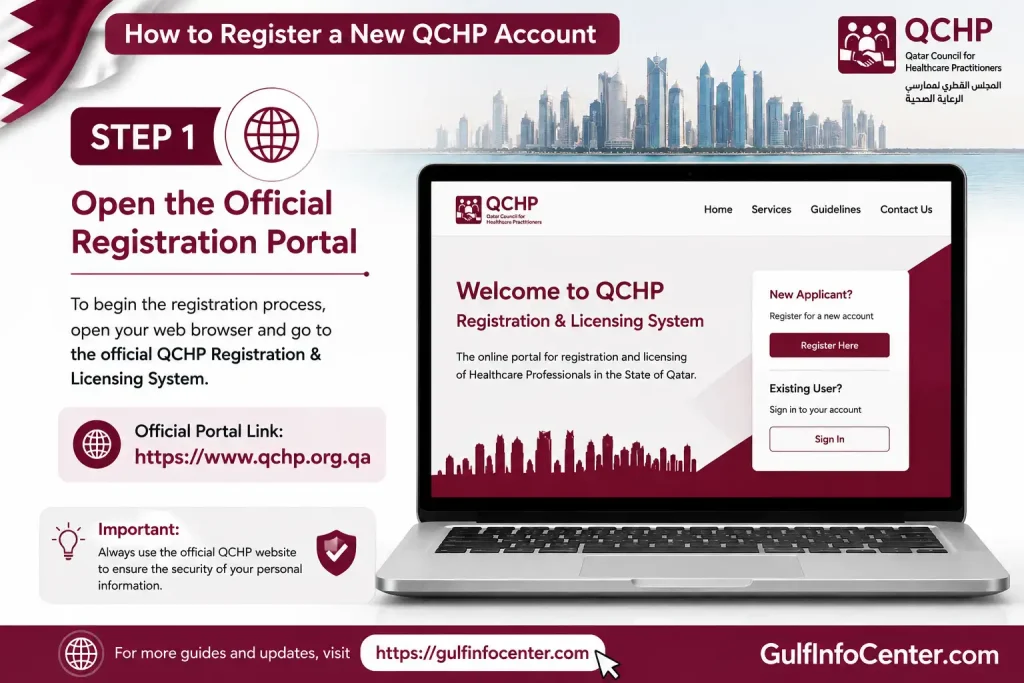
Step 1: Open the Official Registration Portal
Visit the official Department of Healthcare Professions (DHP) registration page and access the Registration & Licensing System.
Step 2: Choose “Sign Up as a New Applicant”
On the applicant system, select the option for Register/Sign Up. The DHP applicant manual directs first-time users to choose “Sign up as a new Applicant” to begin the registration process.

Step 3: Provide Your Applicant Information
Complete the registration form with accurate information. The details requested can vary according to the current registration form and may include:
- Full name
- Email address
- Contact information
- Professional details
- Identification information
- Other required applicant details
Make sure the information matches your official documents. Errors at this stage can cause problems when your application and supporting documents are reviewed.

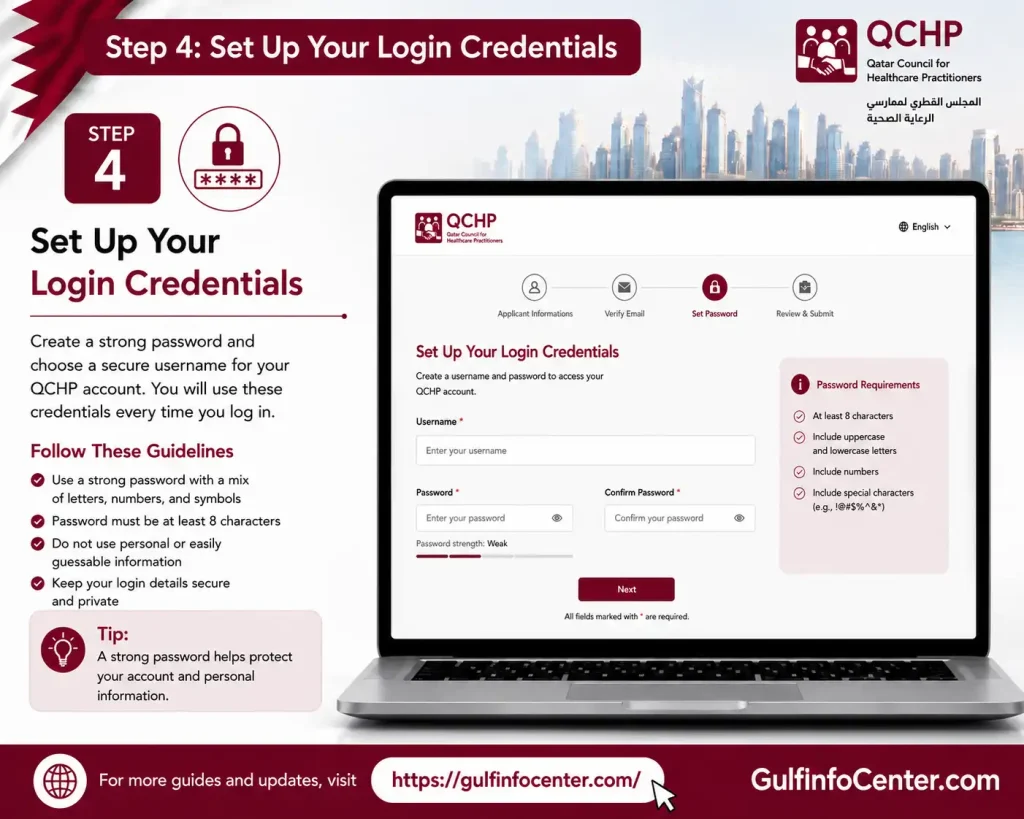
Step 4: Set Up Your Login Credentials
Create the username, email-based login details, password, or other credentials requested by the system.
Keep these details secure. You will need them whenever you return to the portal to access your applicant account.
Step 5: Submit the Registration Form
Review the information you have entered carefully, then select Sign Up/Register to submit the account registration.
Do not rush this step. Incorrect personal, identification or professional information may create complications during later application processing.

Step 6: Activate Your Account
After registration, check the email address you provided for an account activation or verification message. The DHP applicant instructions require new users to open the email and select the activation/verification link before attempting to log in.
If you do not see the message immediately, check:
- Inbox
- Spam or Junk folder
- Promotions folder, if your email provider uses one

Step 7: Return to the Portal and Log In
Once your account has been activated, return to the DHP Registration & Licensing System and sign in using the credentials you created during registration.
You can then proceed with the services available through your applicant account.ensing System and sign in using your registered credentials.

QCHP Account Login

Step 1: Visit the Official QCHP/DHP Website
Start by opening the official Department of Healthcare Professions (DHP) registration page. This is the current portal for healthcare professional registration and licensing services in Qatar.
Avoid entering your username or password on unofficial websites that simply promote a “qchp login cpd” service.
Step 2: Access the Registration and Licensing System
From the official DHP registration page, open the Registration/Licensing System. The applicant system provides different options for people who already have an account and those who need to register as new applicants.
Step 3: Choose the Login Option
If you already have a DHP account, select the Login/Sign In option to access your existing application account.
Existing applicants use their registered login credentials to enter the system.
Step 4: Enter Your Account Details
Provide the information requested on the qchp login qatar screen. This may include:
| Login Field | Information Required |
|---|---|
| Username / Email | Your registered account username or email |
| Password | Your account password |
| Captcha | The security code displayed on the screen, if required |
Review the details before continuing to avoid login errors.
Step 5: Sign In to Your Account
Select Sign In or Login after entering your credentials. If the information is accepted, you can access your applicant account and use the registration, licensing and application services available to you.
Important: The exact fields or wording displayed on the live portal may change. Follow the instructions shown on the official DHP system when logging in.
QCHP Username and Password
Your DHP login credentials allow you to access the applicant system and manage the services available through your account. Before attempting to sign in, make sure your account is properly registered and activated.

Check These Details Before Login
- Confirm that you have already created your applicant account.
- Make sure your registered email/account has been activated.
- Enter the correct username or registered email address.
- Check that your password is accurate.
- Make sure Caps Lock is not affecting the password you enter.
- Confirm that you are using the official DHP/MOPH registration portal rather than an unofficial login page.
The official DHP applicant documentation states that users access the system with their registered email/username and password.
QCHP Password Recovery
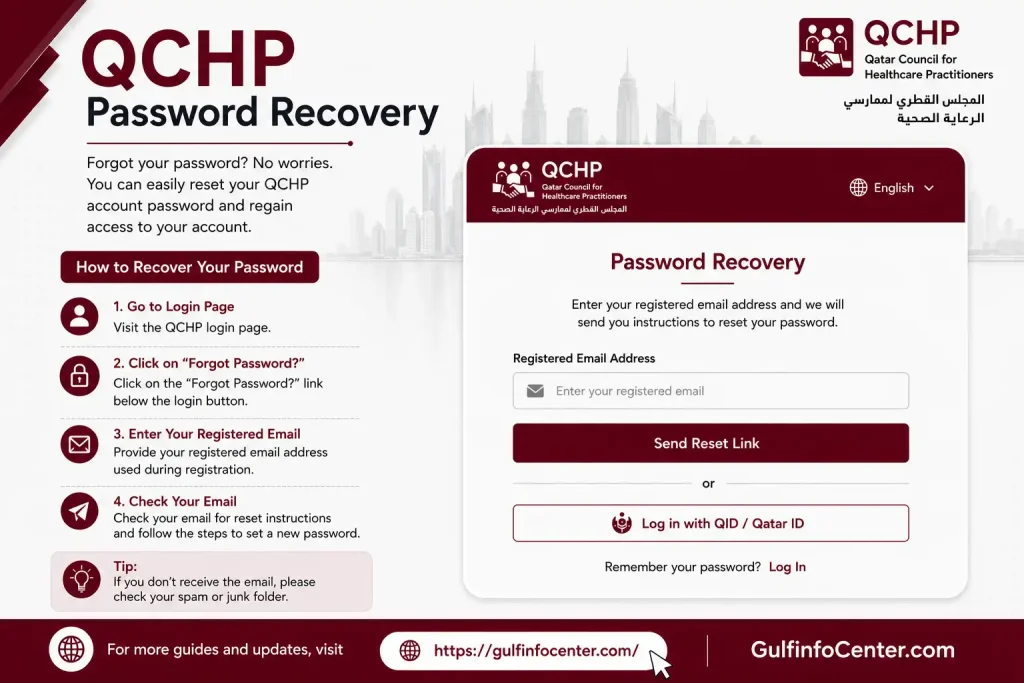
If you have forgotten your DHP account password, use the password-recovery facility provided through the official Registration & Licensing System instead of registering a second account.
How to Reset Your QCHP Password
- Open the official DHP Registration & Licensing System.
- Select Login / Sign In.
- Find and select the Forgot Password or password-recovery option.
- Enter the account information requested by the system.
- Submit the recovery request.
- Check the email address linked to your applicant account.
- Open the password-reset message and follow the instructions provided.
- Set a new password when prompted.
- Return to the login page and sign in using your updated credentials.
Didn’t Receive the Recovery Email?
Before trying to create another account, check the following:
- Look in your Spam/Junk folder.
- Confirm that you entered the correct registered email address.
- Make sure your applicant account was successfully activated.
- Check whether your email provider has blocked or filtered the message.
Important: Avoid creating multiple applicant accounts simply because you cannot access an existing account. Recover the original account whenever possible.
Accessing Your QCHP Application
Once you have successfully signed in, the /DHP applicant dashboard becomes the main place to access the services available to your account. The options shown can depend on your healthcare profession and the stage of your application.
General Application Flow
The process can generally be understood as:
Login → Applicant Dashboard → Registration/Licensing Service → Application → Documents & Requirements → Submit → Track Status
After opening the dashboard, select the relevant registration or licensing service and follow the instructions displayed by the system. You may be required to provide application information and supporting documents before submitting the request.
Important: The available services, fields and screens can change. Always follow the options and requirements currently displayed within your official DHP applicant account rather than relying on outdated screenshots or instructions.
Checking QCHP Application Status
You can review the progress of your DHP application through the official system linked to your application. The dashboard can show the current status along with any messages or actions that may require your attention.
How to Check Your Application Status
- Open the official DHP/MOPH Registration & Licensing System.
- Sign in using your applicant username or registered email and password.
- Go to your Applicant Dashboard.
- Find the application you have already submitted.
- Open its details or status section.
- Review the current application status and any messages displayed by the system.
- If DHP requests additional documents, information or corrections, follow the instructions provided and complete the required action through the appropriate official channel.
Use the Correct Status Service
Do not assume that a third-party website offering a “status checker” is an official DHP service. The source material also notes that certain verification processes have used separate verification-status services. Therefore, applicants should use the specific status channel that applies to their application rather than relying on an unrelated status-checking website.
Common QCHP Login Problems
Login issues can often be resolved by checking your account details, activation status and the portal you are using. The table below covers common problems and the appropriate action to take.
| Problem | Possible Solution |
|---|---|
| Wrong password | Re-enter your password carefully or use the password-recovery option. |
| Wrong username/email | Make sure you are using the username or email linked to your registered applicant account. |
| Account not activated | Check your registration email and complete the account activation process. |
| Activation email missing | Check your Spam/Junk folder and confirm that you are checking the email address used during registration. |
| Login page not working | Refresh the page or try accessing the system through another supported browser. |
| Captcha error | Reload the page to generate a new captcha and enter the displayed code again. |
| Account locked/access issue | Use the official account recovery or support route available through DHP. |
| Application not visible | Confirm that you have signed in to the correct applicant account associated with the application. |
| Old link | Use the current official DHP/MOPH portal instead of an outdated QCHP link. |
| Third-party website requesting credentials | Do not enter your password. Return to the official DHP/MOPH portal and sign in there. |
Security reminder: A website using the words “Login” does not automatically mean it is an official service. Always verify that you are using the current DHP/MOPH portal before entering your account credentials.
QCHP Login Requirements
Before signing in to the DHP system, make sure you have the basic information and access needed to use your account.
Keep These Ready
- Your registered username or email address
- Your account password
- Access to the email address registered with your account
- A stable internet connection
- A modern web browser
- Your application or reference information when checking an existing application
- Any required professional documents if you are continuing an application after login
Having these details available can reduce unnecessary delays when accessing your account or working on an application.
QCHP Login vs QCHP Registration
The main difference is whether you already have an applicant account. Existing applicants can sign in directly, while new applicants must create and activate an account before accessing the system.
| Feature | Existing Applicant | New Applicant |
|---|---|---|
| Account | Already created | Must create a new account |
| Login | Required to access the account | Available after registration and activation |
| Username/Email | Uses existing credentials | Created or provided during registration |
| Password | Uses the existing password | Set during registration |
| Email Activation | Already completed | Required after registration |
| Dashboard | Available after login | Available after activation and login |
| Applications | Can view or manage existing applications | Can begin applicable services |
Key difference: If you already have a DHP applicant account, do not register again simply to access your application. Use your existing login credentials or the official password-recovery process if you cannot sign in.
Important Security Tips
Protecting your DHP account is important because the system may contain personal, professional and application-related information. Always use the official DHP/MOPH portal when entering your login credentials or submitting professional information.
Never Share Your Account Information
Do not give anyone access to:
- Your account password
- Email verification or activation links
- One-time security codes
- Password-reset or account-recovery links
Be particularly cautious with messages or websites asking you to provide these details.
Avoid Unofficial QCHP Services
Do not rely on websites or individuals claiming that they can provide faster approval, guaranteed professional licensing, or paid “login recovery”. Account access and application-related activities should be handled through the official government system.
Security rule: If a website or person asks for your DHP password or recovery information, stop and verify that you are dealing with an official DHP service before providing anything.
FAQs
Final Thoughts
The QCHP Login and Licensing process is an important step for healthcare professionals who want to work legally in Qatar. Since is now managed by the Department of Healthcare Professions (DHP) under the Ministry of Public Health, applicants should always use the official DHP portal for registration, login, document verification, examinations, license issuance, renewals, and Good Standing Certificate requests. The process can involve multiple stages, so keep your documents accurate, monitor your application status regularly, and verify the latest requirements for your specific profession before paying any fees or booking an examination. Most importantly, avoid unofficial websites promising guaranteed approval or faster licensing, as only the official DHP/MOPH process determines your professional eligibility and license status.


